Setting up the unofficial Bloodborne PC port just got a whole lot easier. The Bloodborne PC Enhanced Installer streamlines the entire process—handling PKG integrity checks, automated file extractions, and setting up the latest Windows PC port (bbport v1.6) out of the box.
Designed to give you a stable, vanilla-plus experience, the installer configures a performance-focused default setup (targeting 60 FPS) while packaging a curated selection of community-favorite graphical upgrades and quality-of-life mods.
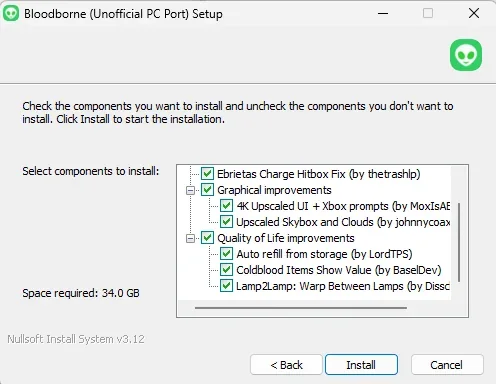
What’s Included in the Installer? All included enhancements are enabled by default for a seamless experience, but individual mods can be customized or disabled directly through the configuration menu (Bloodborne.exe).
Xbox Controller Prompts & 4K Upscaled UI (by MoxIsABox)
Upscaled Skybox and Clouds (by johnnycoax)
Auto Refill from Storage (by LordTPS)
Coldblood Items Show Value (by BaseIDev)
Lamp2Lamp: Warp Between Lamps (by Disschorde)
Ebrietas Charge Hitbox Fix (by thetrashlp)
Getting Started & Requirements Game Files: You must provide your own legally obtained Bloodborne game files and v1.09 update (CUSA03173). The installer verifies file integrity automatically but does not distribute copyrighted files.
Linux & Steam Deck Support: An experimental installer is also available on the main download page, tailored to fetch the non-forked bloodborne_pc v1.5 and place all configuration and mod files in their correct Linux directories.
Project & Source Code Download & Project Page: Mulderland Games
Open Source Code: Fully open source and built via GitHub Actions. Inspect the source via the MulderLoad GitHub Repository.

 View full image