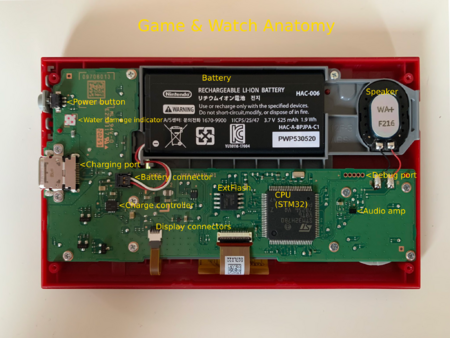
This is a bare skeleton of a Game & Watch Mario / Game & Watch Zelda wiki. It will probably need to be moved, have a namespace created for it, be expanded, reorganized, etc. The intent is to create a starting point.
Useful links
- game-and-watch-noob-installer, the fastest, recommended way to install homebrew
- Small hardware wiki on Github
- Reddit modding wiki
- Mario edition modding guide
- Schematics and PCB for Game & Watch Mario
- stacksmashing discord
Commonly used versions of Retro-Go
Retro Go, a retro emulation firmware originally for the Odroid-Go and similar devices, has been ported to the Game & Watch.
- https://github.com/kbeckmann/game-and-watch-retro-go - Original port of Retro-Go. Archived.
- https://github.com/olderzeus/game-and-watch-retro-go - Fork that adds game covers and Sega Genesis, Watara Supervision, Atari 7800, MSX1/2/2+, and Amstrad CPC6128 emulators.
- https://github.com/sylverb/game-and-watch-retro-go - Fork of Olderzeus fork with a better NES emulator, a new Tamagotchi P1 emulator, and support for ports of The Legend of Zelda: A Link to the Past and Super Mario World.
Common flash chip footprints
- 8SOP: Same as stock chips, easiest to solder. Capacity up to 16 megabytes.
- 8WSON: Harder to solder, capacity up to 64 megabytes.
- 24-LBGA: Very difficult to solder, capacity up to 256 megabytes. Requires either an adapter like this one or deadbug soldering like this.

Work is being done on Micro SD card mods, but they are difficult and have little support at the moment.
Options to flash without opening the device
- SWCLK and SWDIO can be connected to the D+ and D- pins of the USB-C charging port so they can be connected to from the outside. This does mean that when you connect the G&W to another device, that device may send some USB signals to the JTAG port, but this does not seem to have caused any problems. With a custom cable and the usual programmer, the G&W can then be programmed from the outside as normal.
- A sufficiently small debugger can be installed inside the G&W and connected to D- and D+ of the charging port, so that you can connect your G&W to your PC with a normal USB-C cable, and program it as normal.
- The Game & Watch SWD Implant can be installed for a dedicated programming port.
Tim Schuerewegen's software
https://www.schuerewegen.tk/gnw/ hosts Tim Schuerewegen's homebrew loader and several applications for it. Note that source code is not provided and the File System Builder/Stock Firmware Patcher are Windows only.
Images