As the GameCube's EXI buses (used for memory cards and serial ports, among other internal functionality) are based on SPI, other SPI devices may be connected to it.
SD and MMC cards are no exception; in fact, Nintendo officially released the DOL-019 adapter to connect a first-generation SDSC — partitioned to 1GB or smaller — to a memory card port, for the use of two compatible titles (Animal Crossing e+ and Pokémon Channel) for screenshots and data exchange - in Japan only.
The DOL-019 contains no electronics apart from noise filtering, and eventually clones started appearing under a variety of names: the WiiKey SD Adapter, the Datel SD Media Launcher (bundled with a boot disc), etc - eventually getting the umbrella term SD Gecko. The unfiltered clones (all but the Datel) even became preferable due to being compatible with double speed 32 MHz operation.
Homebrew can make use of a SD card for storage via the memory card port if you have an adapter. Most commonly, people access their SD cards using Swiss to then boot a game or application of their choosing.
SD Media Launcher
The SD Media Launcher by Datel is a retail product which is an SD adapter bundled with an SD card and a disc that can boot on an unmodified GameCube with a simple file browser to launch executables from your SD card. While SDMediaLauncherUK.pdf, it is a very simple application with navigation with  and
and  ,
,  to open a folder or run a .DOL file, and
  to go back up a folder level.
SD2SP2
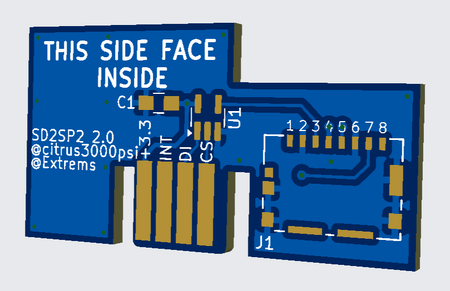
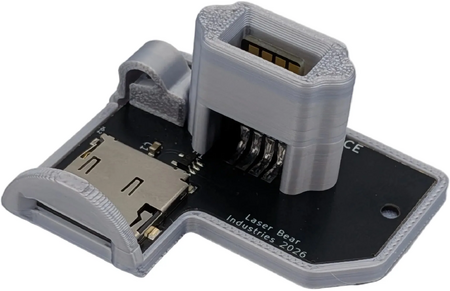
SD2SP2 is an adapter PCB that connects to the SP2 port on the bottom of the GameCube. This allows you to have your memory card slot free, but have a micro SD card connected to the console.
There is an open source "v2.0" version on Extrems' GitHub to produce your own. This "v2.0" version fixes data streaming issues and decreases CPU usage when using the SD2SP2. You can purchase one from LaserBear, including the alternate "pro" or "ace" versions which make the port accessible from the side of the GameCube, which is recommended if you have a Game Boy Player on the bottom of your console already.
DIY SD Adapter
Instructions for creating your own SD adapter can be found on GD-Forever.