This page details several faults discovered while servicing various PAC-S10/S1 modules and their solutions.
Partial Troubleshooting Schematic
Most times, the Mega Drive/Genesis section of the PAC contains most of the faults that prevent a PAC from working properly. As detailed below, many signals from the 68K and Z80 will become severed from the 315-5660 VDP, leading to a black screen when trying to boot. This schematic has the proper pinout for the 68K CPU package used in the PAC, along with convenient VDP pin references next to each signal to allow users to check continuity from all of the IC's back to the VDP.
PAC-S1/10 MD/Genesis Troubleshooting Schematic
Post-Recap Voltage Rail Check
After performing any capacitor replacement work, it is imperative to check the three voltage rails (+5, +8, -8) for short circuits. If there is a short circuit on any of these rails, it will damage the CLD-A100 player. Both the MAIN and SUB boards have fuses that are labeled with the voltages they protect on the back side of each board. Check that these are not shorted to Ground on BOTH boards. Also note that the SUB board has two grounds - one for digital and one for audio, which are joined together when connected to the MAIN board. The fused 5V rail is referenced to the digital ground and can be checked by measuring continuity to the ground on C506.
-
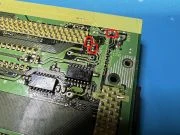 Fuse locations on the PAC-S10 MAIN board
 -
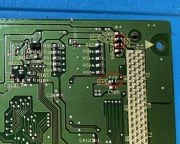 Fuse locations on the PAC-S10 SUB board
Further, after ensuring no shorts, verify that the fuses for the voltage rails still have continuity. If a replacement is needed, a size 0805 1.25A fuse is recommended for the +5V rail and size 0805 0.5A rated fuse for the +8V and -8V rails. These current ratings will ensure that, in the event of a short circuit, the surface mount fuse will blow before the ICP's in the Laseractive.
BIOS Freezes at Power On
This issue has more than one root cause.
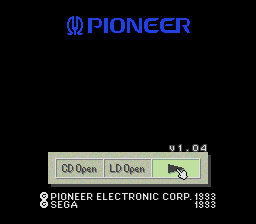
No Mega LD/CD Logos appear
Missing PCM Chip Select Line
Due to its proximity to C310, electrolytic fluid corrosion could have severed the PCM Chip select line to the SSUB connector, causing a bus collision, as the chip select line on the PCM ASIC has no pulldown/up to counteract a floating state. First, ensure the via to the left of C310 has continuity to IC28, pin 89. Then, check if it has continuity to pin 31 of the SSUB connector. If continuity is missing between either of these, restore it.
-
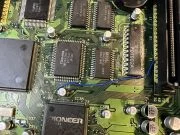 PAC-S10, PCM CS signal restored to SSUB connector
Missing BRAM (Save RAM enable) signal
The BRAM trace runs directly under C312 and is vulnerable to electrolytic damage. Use the indicated points on the bottom side of the board to determine whether the BRAM trace has continuity back to the MCE.
-
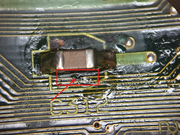 BRAM trace severed under C312
 -
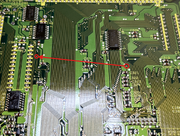 BRAM trace nodes
Missing /AS from Sub CPU (IC13) to IC49
Missing Control signal from Pioneer ASIC to PAC Connector
If a Sega CD Model 1 BIOS can boot and run a game, but the LaserActive BIOS freezes at boot, then there is a communication issue between the Pioneer ASIC and the player interface. Check the vias that connect to the Pioneer ASIC (neighboring C309 and X1).
Data Line shorted or missing (5V/GND/adjacent pin)
The solder mask on the PAC is easily eaten away by electrolytic fluid. Ensure that the data lines for the PCM ASIC (refer to the schematic) are not shorted to 5V or GND, as the legs of leaded capacitors touching the traces can cause a short.
Additionally, data lines to Program RAM (IC's 24-27) or to the Sub CPU (IC13) may have been eaten by electrolytic fluid. verify all connections (refer to Mega CD 1 schematics).
Logos appear, spin, but BIOS unresponsive - Missing Signals from IC36
Electrolytic fluid from C311 can potentially damage the pads for IC36, pins 135-144. Some pins' traces are plainly visible on the top side of the board and should be checked for continuity to IC28. However, Pin 139 is the VSQ signal originating from the CLD-A100, and should connect to Pin D25 of the PAC connector. Pin 140 should have continuity to IC28, pin 30.
-
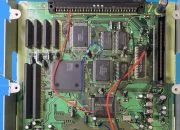 PAC-S10 IC26 Signals Restored
Blank Screen on Power Up without Cartridge - Cartridges still load - CSYNC still present
A signal is missing from the Sub CPU that is halting it. Possible causes: Corroded traces under the Pioneer ASIC on the bottom of the board Missing "AS" signal from sub CPU to AS digital switch (switches between MCE and Pioneer ASIC) - signal runs beneath C312, raising probability of damage Missing signal from MD CPU/VDP to MCE
-
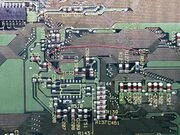 Repaired Sub CPU corroded traces underneath Pioneer ASIC
 -
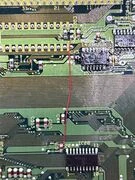 Repaired AS connection from Sub CPU pin 48 to Pioneer ASIC/MCE switch
Blank Screen on Power Up - Cartridges and BIOS do not load - CSYNC still present
Assuming no short circuits were measured across any voltage rail on the PAC, one root cause for this issue is the "D15" signal (IC1, Pin 32) being severed. This trace runs directly under C302, which has likely corroded the trace after years of being exposed to electrolytic fluid.
Restore the signal by reconnecting Pin 32 to the plated via next to the "40" text, adjacent to the BIOS EEPROM.
If the screen is still blank (black), look for other signals missing between the 68000 CPU, its RAM, and the 315-5660 VDP.
-
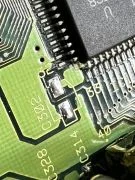 D15 Signal from IC1 (68000 CPU) damaged from electrolytic fluid corrosion
 -
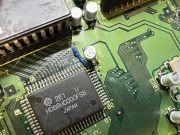 D15 Signal from IC1 repaired by connecting to an adjacent via
No video output at startup (no CSYNC), Works without SSUB attached
The system reset IC (IC43) has been severed from the reset amplifier for MRES and SRES. Check that IC45, Pin 3 is connected to R66 (bottom side).
-
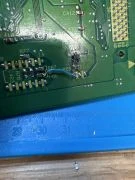 IC45, pin 3, restored to Reset Circuit
 -
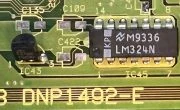 IC43 Reset Signal runs underneath C422
No video output (No CSYNC), with or without SSUB
The LD VSYNC trace may have been corroded by C330 or C331. Verify that the nodes indicated have continuity - both need to have continuity to pin B14 on the PAC rear connector.
-
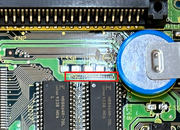 LDVSYNC trace near C330 and C331
 -
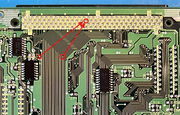 LDVSYNC nodes to verify and reconnect
Missing/No Sound In Certain Games, Cannot boot Master System games
This is due to a missing data line from the Z80 CPU to the Sega 315-5660 ASIC. C129 is near the lines for D13-15 vias from the Z80 to the 5660 and C111 is near D5-7, increasing the probability of damage from extended exposure to leaked electrolytic fluid. First discover where the signal is lost and then jump the signal to the appropriate trace.
If there are no signals missing, but these symptoms persist, the Z80 CPU or its RAM (IC5) may need to be replaced.
-
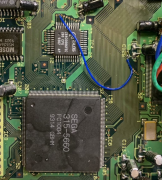 Z80 D14 signal restored to 315-5660 ASIC
 -
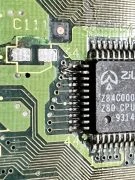 Z80 D6 signal restored to 315-5660 ASIC
 -
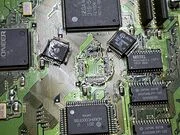 Z80 Replacement
Horizontal Color Smearing
The PAC-S10/S1 employs separate voltage regulators to bias the emitter follower buffers for the RGB signals. The trace that provides voltage to the RED signal buffer is adjacent to C453, which is prone to heavy leakage and can sever the +5V regulated voltage line. This repair can be accomplished by using a thin gauge wire/component lead to jump the top side metal to the bottom side, or a wire can be used to directly jump the signal via the component pads as shown.
-
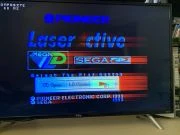 Issue caused by RED signal buffer missing a voltage rail
 -
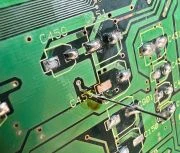 Restoring +5V with a component lead, before trimming
 -
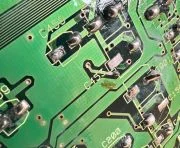 Restoring +5V with a component lead, trimmed
 -
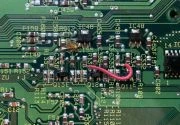 Restoring +5V with a wire
Blank screen, game audio still present
If the video output is blank, but audio from games is still audible, then the connection to analog video VCC may have been severed, as it is in direct proximity to C150, which is prone to severe leakage. Verify continuity from C150+ to pin 38 of the 315-5660 VDP.
-
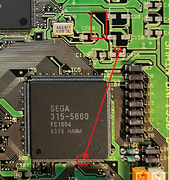 Analog video VCC nodes
PSG audio is present/Master System games have audio but FM synth is missing on Genesis games
This is caused by a bad connection on the SSUB board, more commonly this occurs when there is a cold/bad connection on capacitors C102 and C105. These two capacitors are responsible for delivering audio to the rest of the SSUB board. Ensure that there are no ripped pads, corroded traces or cold capacitor legs on these capacitors. Installing a PAC ATTACK/Triple Bypass will also solve this problem as it bypasses these capacitors entirely. It would also be prudent to check surrounding capacitors in that area for any damage to pads/traces.
Missing or Distorted PCM Audio [SUB BOARD]
If CD game audio (i.e. Sonic CD opening cutscene animation) is missing or is distorted, an address/data line may be disconnected from the PCM ASIC (IC15) to the PAC SUB connector, or between the PCM ASIC and its RAM (IC14 and IC21), or one/both of the PCM RAM IC's may be defective. Verify all connections before suspecting defective RAM.
Loading Error on CD/LD Games Despite Player Working Fine [MAIN BOARD]
If the PAC fails to load same-region disc-based games, but the LaserActive can play CD's and LD's without issue otherwise, there are missing signals between the LC8951 CD decoder (IC32) and its RAM (IC17 and IC18) or to the Mega CD Engine (MCE, IC28).