The PS1 natively outputs RGB signals, but does not output CSYNC. Some RGB cables either extract CSYNC from the Luma pin or from the composite video pin, while some just passthrough the either of those signals and let the next device in the video chain handle the signal. While passthrough cables work for most upscalers and professional video monitors, some equipment such as professional Extron equipment (e.g. Crosspoints) require clean CSYNC or RGBHV to work.
Many of the points were identified in this thread by Wesk.
Connection Options
This guide will provide the information needed to tap RGBS or RGBHV signals, it is up to you on how to wire the output connector as there are a few options and it depends on the wiring of the cable you wish to use.
Some available options are:
- For RGBS:
- Replace either the luma or chroma signal on the AV port with CSYNC (this disables s-video).
- Replace the composite video signal on the AV port with CSYNC (this disables composite video, unless you have a model with a dedicated composite port).
- Drill a hole in the case and add your own RGBS-capable port.
- For RGBHV:
- Remove the serial port and install a female VGA port (optionally with Wesk's VGA mount 3D print).
- Replace the luma and chroma signals on the AV port with H-Sync and V-Sync (this disables s-video).
- Drill a hole in the case and add your own RGBHV-capable port.
Signal Points
Generally, the CSYNC signal can be tapped directly from pin 10 of the Sony CXA1645M chip on the bottom side of the motherboard but there are easier access points to solder to.
PU-7 / PU-8 / PU-18
Unknown.
PU-20
There are points to access the signals on both the top and bottom of the motherboard. Choose which is more convenient for you.
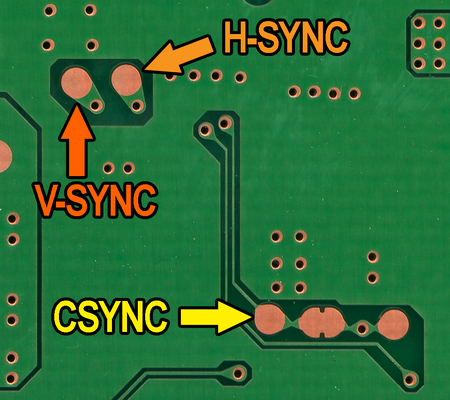
PU-22
There are points to access the signals on both the top and bottom of the motherboard. Choose which is more convenient for you.
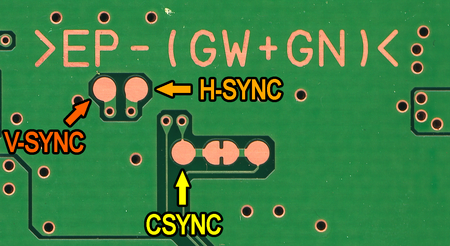
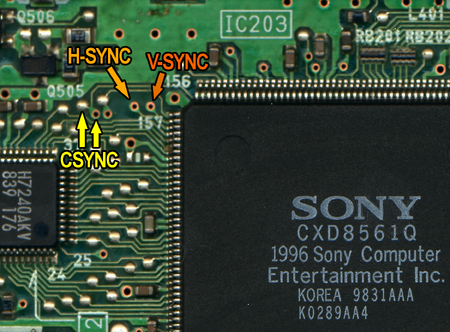
PU-23
Unknown.
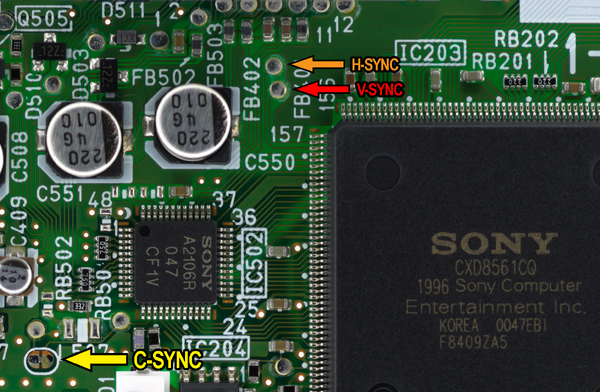
PM-41
The CSYNC signal must be passed through a 75 ohm resistor and a 220 uF electrolytic capacitor before being used.[1]
PM-41 (2)
Later PSone motherboards are marked with PM-41 (2). It is unknown if there are usable points on the motherboard, as it visually appears to not be the same as the PM-41.