The PS2 outputs RGB, YPbPr component, S-Video, composite, and RF (via an external modulator). Through a mod, you can also tap VGA output from the PS2 motherboard. Another mod can sacrifice all other video mods to make the console output CSYNC.
| Model | 240p | 480i | 480p | 720p | 1080i | 1080p | Other |
|---|---|---|---|---|---|---|---|
| PlayStation 2 | Yes | Yes | Yes | No | Yes | No |
Component YPbPr vs RGB
Overall, using a set of component video cables may be the best solution for most people. There are a few very specific scenarios using RGB might be preferred:
- Using a display or processor that doesn't accept component video.
- Connecting to a setup that entirely uses RGB SCART cables.
- Using a CRT that only supports 15 kHz signals (240p and 480i).
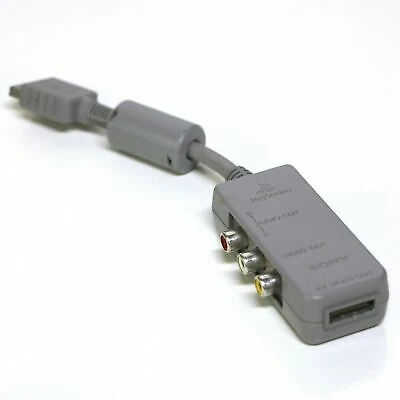
For light gun games, an SCPH-1160 adapter can be used to break out composite video for use with light guns such as the GunCon. Alternatively, most RGB SCART cables made for the PS2 have a composite video breakout on it for this purpose.
Depending on the setup, component video can be run through an RGB SCART cable, simply by switching video modes in the system menu. This would only be beneficial for devices which can accept component over their RGB input, such as some Sony PVMs and other professional RGB monitors.
Sync on Green (SoG)
When the PlayStation 2 is set to RGB output (not component), it outputs standard RGB with sync available over composite video or luma in 240p/480i modes. Once the console switches to 480p output, the signal changes to RGsB, or "sync on green". In this mode, the sync signal is sent over the green color line and nothing is outputted from CVBS or luma. More info on this can be found here. There are a few ways to use RGsB and there’s a chance you already have equipment that supports it:
Devices like the Open Source Scan Converter (OSSC) will accept RGsB from a PS2, simply by switching the input after 480p mode is selected (or set the OSSC to auto scan the inputs). The latest version of the gscartsw will automatically convert RGsB to RGBs when it's in 480p mode. That means simply plugging in an RGB SCART cable will get your RGBs in all resolutions - Just make sure to toggle the correct jumpers when setting up the gscartsw. Some 480p capable RGB monitors can accept a RGsB signal, simply by toggling the external sync button off when RGsB is enabled. Many (if not all) Sony monitors that support 480p have this option.
RGBHV Output
There are people who have successfully modified their PS2 to output RGBHV — specifically motherboards older than the GH-015. Information for this can be found here: