GlitchMod tutorials
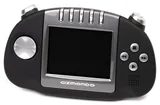
Gizmondo modding wiki
Gizmondo hardware and manual preservation, SD media backups, legacy service limits, historical homebrew requirements and practical diagnosis.
Browse topics
Tutorials & referenceGizmondo modding and preservation wiki
Gizmondo hardware and manual preservation, SD media backups, legacy service limits, historical homebrew requirements and practical diagnosis.
Preserve a working device
Gizmondo's original manuals describe a product designed around both offline applications and contemporary commercial services. Preserve the current configuration and readable media before resetting a surviving unit. Record firmware, labels, battery condition and which local functions actually work. A newly erased device can face registration or software requirements that a configured unit no longer encounters.
Historical messaging, Smart Adds and location-service instructions are evidence of the original design. They do not promise a working current carrier or server. Test offline games, controls, sound and media separately from network-dependent features. Keep personal photos, contacts and other private data out of a public preservation archive.
Media and development evidence
The backup guide separates original cards, whole-card images, copied application directories and user data. Retain an untouched master, then validate a working copy in the device. Historical ActiveSync instructions may need an appropriate older PC environment; do not assume current desktop software supplies identical driver support.
The homebrew guide uses the original PicoDrive port instructions as a concrete example. Its Gizmondo executable, supporting library and homebrew-enabled service-pack prerequisites are specific to that port. A modern cross-platform emulator repository can describe more features than a historical Gizmondo binary provides. Identify the actual build before making a compatibility or performance claim.
Contribute narrowly
Provide the original project or manual, the exact device and software version, and a repeatable test. If an old prerequisite or download cannot be verified, state that limitation. Do not fill a missing firmware procedure with an improvised flash sequence or assume a charger is suitable because its plug fits.
Use this directory
Choose a guide by the work you intend to do, then record the hardware model, installed software and existing condition. Preserve data before a reset, storage change or firmware write. Each guide links primary documentation and separates documented requirements from editorial checklists. Keep a known-good baseline, change one variable at a time and verify a restore where saved progress matters. When contributing, include the exact tested configuration and source revision so another reader can reproduce the result and understand its limits.
Sources and review
Reviewed October 11, 2026. The linked manufacturer and project documentation establishes supported behavior. The diagnosis checklists and preservation suggestions are original editorial guidance. Menus, services and project support can change; verify the linked instructions before an irreversible change.