GlitchMod tutorials
NEC PC-FX modding wiki
PC-FX identification, import setup, controllers, disc diagnosis, internal backup memory and FX-BMP preservation, FRAM upgrade planning, video and homebrew tools.
Browse topics
Tutorials & referenceNEC PC-FX modding, repair and homebrew
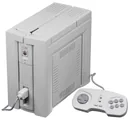
Use this section to identify a PC-FX, plan import power and display connections, preserve internal and FX-BMP saves and investigate optical or controller faults. Start with the original NEC controls and the developer community's first-hand hardware research. Retail PC-FX, PC-FXGA development boards and other NEC consoles are separate hardware targets.
Source review: October 11, 2026. Guides are original source-linked writing. Original manuals may describe a specific regional model or production revision; modern project documentation may change. Match the exact board, peripheral and firmware before following a procedure.
Begin with identification and setup, then make a preservation plan. A working startup screen is only a first test: disc reading, graphics, sound, controller modes and saving each deserve a separate check. Troubleshooting guides explain how to record a reproducible symptom before choosing an internal repair.
General information and setup
- NEC PC-FX identification and buying checklist — Evaluate PC-FX hardware, controllers, lid and drive, internal saves, FX-BMP accessories and documented repair work.
- NEC PC-FX power, video and controller setup — Plan power from the exact console label, connect documented outputs and controllers, and commission a PC-FX without erasing its saves.
Storage and software compatibility
- PC-FX internal backup memory, FX-BMP and FRAM planning — Preserve internal saves and FX-BMP data, distinguish copied files from tested backups and plan a board-matched FRAM upgrade.
- PC-FX discs, image layouts and emulation compatibility — Use PC-FX media and supported peripherals, preserve complete authorized disc images and distinguish emulation from physical drive replacements.
Repairs and homebrew
- PC-FX disc, controller, save and video repair triage — Separate menu, power, display, controller, optical-reading and retention failures before selecting a PC-FX repair.
- PC-FX homebrew, liberis and V810 development — Build an original PC-FX sample with V810 tools and liberis, package a complete disc and verify loading, controls and native saves.
Original references and related guides
Use legally obtained software and BIOS files with tools that require them. A flash cartridge or emulator's feature list does not establish support for every add-on combination. Board-specific soldering, power wiring, storage conversions and optical adjustments require documentation that matches the actual hardware.