Swiss supports using a custom background. To apply a custom background, rename the desired .tpl file to backdrop.tpl and copy it to the swiss folder on the root of the storage device that Swiss boots from. Upon next reboot, it will have the backdrop applied.
Community-Made Backgrounds
Kuma Collection
Elegant Cube Colors
-
 green-halosmall
 -
 indigo-halosmall
 -
 kuma-halosmall
 -
 orange-halosmall
 -
 pink-halosmall
 -
 purple-halosmall
 -
 red-halosmall
 -
 silver-halosmall
First Trials
-
 gamecube-swiss-purplepastelwave
 -
 gamecube-swiss-purplepixel
 -
 gamecube-swiss-purplesoft
 -
 gamecube-swiss-zelda
 -
 gamecube-swiss-zeldablue
 -
 gamecube-swiss-zeldapink
 -
 rosita-sigils
 -
 gamecube-swiss-gamecube
 -
 gamecube-swiss-gamecubegreen
 -
 gamecube-swiss-gamecubepink
 -
 gamecube-swiss-purplecrystal
 -
 gamecube-swiss-purplenoise
 -
 gamecube-swiss-purplepasoft2
GameCube Styles
-
 swiss-hd-cubeSILVER
 -
 swiss-hd-indigoBLUE-2cubewhite
 -
 swiss-hd-indigoBLUE-inverted
 -
 swiss-hd-indigoBLUE-retro
 -
 swiss-hd-indigoGREEN-2cubewhite
 -
 swiss-hd-indigoGREEN-inverted
 -
 swiss-hd-indigoGREEN-retro
 -
 swiss-hd-indigoORANGE-2cubewhite
 -
 swiss-hd-indigoORANGE-inverted
 -
 swiss-hd-indigoORANGE-retro
 -
 swiss-hd-indigoPINK-2cubewhite
 -
 swiss-hd-indigoPINK-retro
 -
 swiss-hd-indigoPURPLE
 -
 swiss-hd-indigoPURPLE-2cubewhite
 -
 swiss-hd-indigoPURPLE-inverted
 -
 swiss-hd-indigoPURPLE-retro
 -
 swiss-hd-indigoRED-inverted
 -
 swiss-hd-indigoSILVER-2cubewhite
 -
 swiss-hd-indigoSILVER-retro
 -
 swiss-hd-cubeBLUE
 -
 swiss-hd-cubeGREEN
 -
 swiss-hd-cubeORANGE
 -
 swiss-hd-cubePINK
 -
 swiss-hd-cubeRED
Colrust Collection
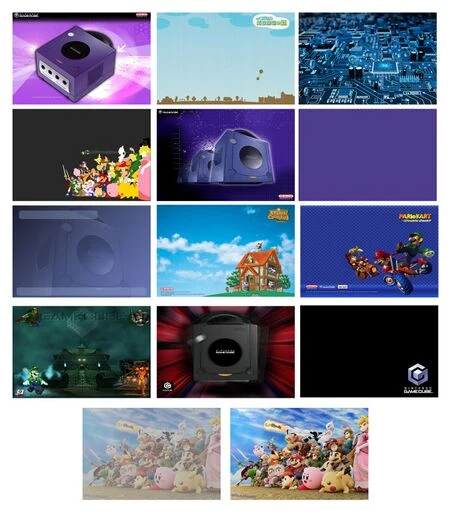
-
 backdrop animal crossing
 -
 backdrop black
 -
 backdrop bright
 -
 backdrop circuit board
 -
 backdrop corner
 -
 backdrop logo bottom right
 -
 backdrop muted
NeoRame Collection
-
 gcloader_darkjewel
 -
 swiss
swiss -
 swiss_darkjewel
 -
 gcloader
Creating Backgrounds
- Create a PNG file that is either 640x480 (4:3) or 720x480 (16:9) and save it as backdrop.png.
- Download the latest version of Wiimms SZS Tools (Szs-v2.42a-r8989-cygwin64.zip) for your operating system and extract it on your PC.
- Copy backdrop.png into the
binfolder. - Double-click szs-console.bat. Type in
wimgt ENCODE backdrop.png -d backdrop.tpl -x TPLand press Enter. A file calledbackdrop.tplwill be created. - Copy
backdrop.tplto theswissfolder on the device that Swiss boots off of. Upon reboot, the background will be applied.