Model 3 Genesis units can have much of the functionality of an original Genesis restored by connecting some pins on the GOAC that are missing connections to the cartridge port (see diagram below). Neither can connect to a Sega CD, but if you’re using a Mega SD or Mega EverDrive PRO, you can restore Sega CD audio by connecting B1 and B3 to a Mega Amp or Triple Bypass.
There are also quick solder boards available for the VA1 motherboard and VA2 motherboard to make installation easier.
Genesis 3 VA1
The VA1 can have 32X, Virtua Racing, Game Genie, and Sega Master System (without FM audio) support restored by connecting wires from the following pins on the cartridge port to the Sega 315-5960 GOAC.
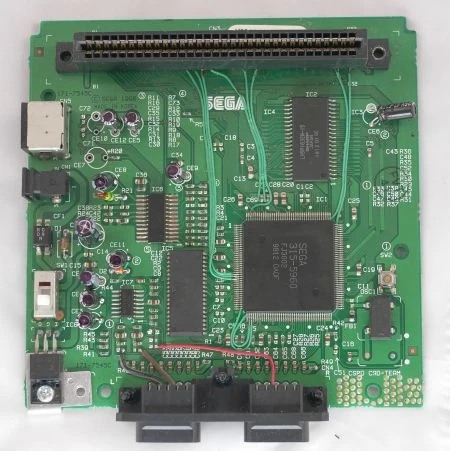
| Cart Port Pin | 315-5960 GOAC Pin |
|---|---|
| B1 (SL1) | Left Audio (XL)* |
| B3 (SL2) | Right Audio (XR)* |
| B12 (YS) | Pin 24 |
| B13 (VSYNC) | Pin 25 |
| B14 (HSYNC) | Pin 26 |
| B15 (EDCLK) | Pin 152 |
| B19 (VCLK) | Pin 151 |
| B21 (CAS2) | Pin 158 |
| B30 (M3) | Pin 43 |
- *Pin on Mega Amp or Triple Bypass board
- It is not necessary to ground the CART pin or connect to the ASIC. The ASIC's pin 42 is already connected to ground.
Genesis 3 VA2
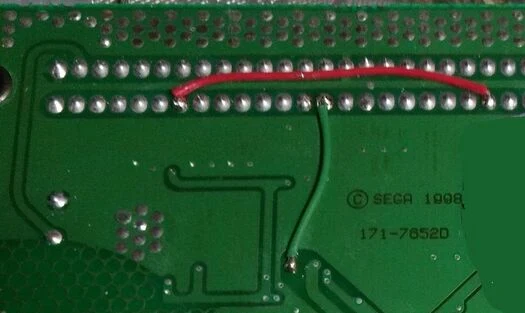
The VA2 can only have Virtua Racing and Game Genie functionality restored, resulting in no expanded functionality past the Genesis library. This is because the ASIC used in this revision, the 315-6123, completely lacks the signals necessary to restore 32X and Master System compatibility. However, cartridge expansion audio can also be restored (for use with Mega EverDrive Pro or Mega SD, for example).
- Connect B1 (Audio Left; XL) and B3 (Audio Right; XR) to a Mega Amp or Triple Bypass board.
- Add a short jumper wire between cartridge pins B26 and B11 as shown below.
- Run wires from the following pin B19 on the cartridge port to pin 154 on the Sega 315-6123 GOAC chip.
In addition, the VA2 has a set of jumpers which can either enable or disable the TMSS (TradeMark Security System) screen which is shown at boot. TMSS is enabled by shorting R30 (default) or disabled by shorting R27. Note that game compatibility may vary and Sega CD games cannot be loaded from the Mega EverDrive Pro or Mega SD if TMSS is disabled.