The Atari Jaguar natively outputs RF, Composite Video (CVBS), S-Video (Y/C), and RGB with CSync. No mods are required. However, components are omitted from within the console itself, therefore to adhere to proper analog video specifications passives will be required for any signal type other than RF and CVBS.
Video Port Pinout
The AV out features a 24 position, chamfered edge connector with 63 mil (1.6 mm) thickness and 0.1" (2.54 mm) pitch. Connect to this port using a Sullins EBC12DCWN or equivalent alternate.
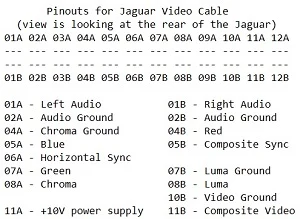
When making a cable, do not share video ground with audio ground. Audio ground will be tied to pins 2A, 2B. Bond video grounds to 10B, 07B, 03B, 04A.
Here's a diagram from Atarimax.com:
Composite Video
Wire the Composite Video (CVBS) line to pin 11B, no components are necessary.
S-Video
No components are necessary for the Luma (Y) line, wired to pin 08B.
A 0.1uF MLCC capacitor is required in series on the Chroma (C) line, wired to pin 08A.
RGB
220uF, 16V AC Coupling capacitors are required in series on the Red, Green and Blue lines, tied to 04B, 07A, and 05A respectively.
If using Composite Sync (CSync) wire to pin 5B with a 470 to 680 ohm, 1/4 watt resistor and a 220uF, 16V capacitor in series. To use Luma for sync refer to S-Video instructions, to use CVBS for sync refer to Composite Video instructions.
Sellers
YPbPr (Component)
The Jaguar does not natively output Pb or Pr signals, therefore component cables will require transcoding. This can be accomplished with an adapter such as the Humble Bazooka Jag2GEN used in conjunction with the HD Retrovision Genesis Model 2 Component Cables.