All versions of the N64 can be RGB and HDMI modded. The UltraHDMI Board works with all versions of the N64, however there are a few choices for RGB. In general, the N64RGB v3 is the cheapest and easiest to install if all you need is RGB output.
Compatible with all N64s
Every N64 can output RGB using a more complicated RGB kit, which are generally more expensive and harder to install, but offer extra features.
- Borti4938's N64Advanced v1 (note that "v2" is an HDMI-only board)
- Outputs RGB / RGsB / YPbPr
- FPGA based digital to analog video mod
- Line doubling (480p / 576p) and tripling (NTSC only, non-standard 720p)
- Simple scanline emulation
- 16-bit mode[1]
- VI-DeBlur
- In game reset
- On screen display for configuration
- Borti4938's N64RGB v2.1
- Outputs RGB / RGsB
- CPLD based digital to analog video mod
- 16-bit mode[1]
- VI-DeBlur
- In game reset
- Comparable to the commercial solution of viletim, but with a dedicated digital to analog converter IC instead of a r2r ladder
- Borti4938's N64RGB_Flex (N64RGB v3)
- Outputs RGB / RGsB
- CPLD based digital to analog video mod
- Easy to install flex board
- 16-bit mode[1]
- VI-DeBlur
- In game reset
- Tim Worthington (viletim / etim)'s N64RGB v4
- Outputs RGB
- VI-DeBlur
- In game reset
- LED data monitor makes it easier to troubleshoot faulty installations
Only compatible with early N64s
Early versions of the N64 (the first 4 board revisions) can output RGB with a board that offers the same video quality, but are _much_ easier to install and less expensive. There are a few tricks to find compatible N64s, but the only way to be 100% sure is by opening it up.
How to find RGB-outputting NTSC N64 Systems
- If you have a serial number that starts with "NS1" (USA), "NUJ1" (Japan) or French systems with the model number "NUS-001(FRA)", then you most likely have an N64 that's compatible. Supposedly, some early Canadian N64s also contain this chip.
- Many older Brazilian N64s can also be RGB modded. Even though Brazil used PAL-M, it was still 60 Hz and only compatible with NTSC games: Nintendo 64 Forever: "Brazilian Nintendo 64"
- If you have a serial number that starts with anything else, or is a PAL console, you'll need to use the "advanced" kits described above.
- For more information on which serial numbers have each motherboard revision, please visit this site: The Official ModRetro Forums: "Nintendo 64 Motherboard Revisions/Serials Info Request"
Confirming the correct chip
Regardless of serial number, please open your N64 to double check that it has the correct video chip that's required for RGB-modding (explained below). To open the system, you'll simply need a 4.5 mm gamebit driver and a Phillips/JIS screwdriver.
- Remove the Jumper Pak or Expansion Pak, then remove the six 4.5 mm gamebit screws holding the shell together.
- With the top case removed, unscrew only the screws that are circled in the picture below:
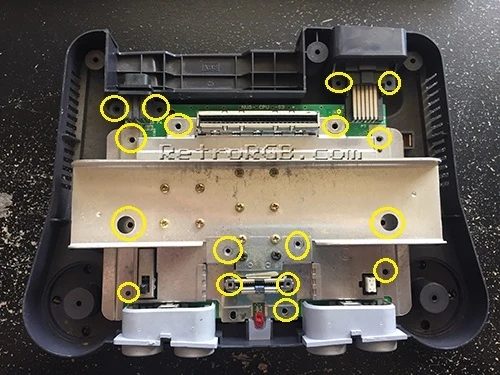
- After removing these screws, the entire metal heat sink and RF shield will lift off as one piece, exposing the motherboard:
- Once the console is disassembled, look for the following chip.
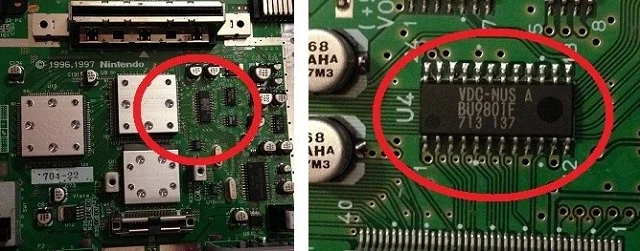
- If it says "VDC-NUS" or "VDC-NUS A" (like pictured below), you should be fine and can proceed with the basic RGB mod.
- If it doesn't have this chip, you'll have to use one of the advanced mods.
Where to purchase
If your N64 is compatible with a basic mod, you can either make your own RGB amp board, or buy one pre-assembled. The pre-assembled ones are recommended, as they generally use better amp chips (THS7374 vs 7314) and some offer more features like a sync stripper.
Notes
- ↑ Jump up to: 1.0 1.1 1.2 Reduces color depth from 21bit (7bit each color) to 16bit (5bit for red and blue and 6bit for green). Some games use the LSBs just for inserting some kind of noise, so the 16bit gives you a clearer image.