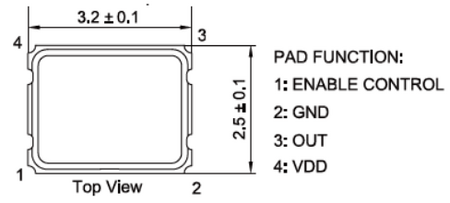
We’ll be modifying the 67 MHz clock signal that the CPU receives. The PlayStation’s CPU automatically divides this signal by 2, resulting in an operating speed of 33.86 MHz. By replacing the 67 MHz signal with an 80 MHz crystal oscillator, we can overclock the CPU to 40 MHz.
Additional cooling is optional and not required—the CPU operates at a modest speed increase, making extra heat dissipation unnecessary. This is a revised version of this article with more detail.[1]
Required Materials
Tools You'll Need:
- Phillips screwdriver
- X-Acto knife or jeweler's screwdriver
- Soldering iron and solder
- 4-pin crystal oscillator
Installation
- Disassembling the PSOne (or PlayStation) is straightforward, but be cautious when removing the CD-ROM assembly — the data ribbon cables are delicate and can be easily damaged. Once you've exposed the motherboard, take a moment to locate the key components you'll be working with:
- CPU
- Clock-generating PLL chip
- Voltage regulator
- Locate the PLL chip and carefully disconnect pin 5, which is responsible for outputting the 67 MHz signal to the CPU. Once disconnected, test the PlayStation — if done correctly, the system should not boot.
- To power the new 80 MHz oscillator, connect a +5V power source and GND (ground) to the appropriate pins. A common ground point is a screw securing the RF shielding, while +5V can be sourced from the voltage regulator.
- Raise pin 4 on the CPU and connect a wire from the oscillator's output pin to it. Be very careful here — use a fine-tipped soldering iron to gently lift pin 4. A jeweler's screwdriver or X-Acto knife can help with this step. Double-check all pins to ensure they aren’t touching nearby ones, as they are fragile.
- Once you've securely connected the oscillator output to pin 4 on the CPU, review all connections. If everything looks good, reassemble the PlayStation, hook it up, and test it. Overclocking results may vary, but if done correctly, your system should boot at 40 MHz instead of 33.86 MHz.