The Wii remote — commonly unofficially referred to as the Wiimote — can have a variety of issues.
Pairing Wii Remotes
To pair a Wii remote, press the red sync button on the console under the SD card door and then press the red sync button on the Wii remote under the battery cover. After a few seconds, it should pair.
If the Wii remote's LEDs show three lights on and one light off, it is attempting to pair but failing, possibly due to interference, low batteries, or in a state that cannot pair controllers. If you are in a homebrew app, try returning to the Wii Menu before pairing.
Holding the sync button on the console for 15 seconds will unpair all devices and reset to a fresh state.
Cleaning Battery Corrosion
If your Wii remote had AA batteries in it that corroded and leaked, it will need to be cleaned. It's recommended to pop the battery terminals out of the shell and desolder the ones from the circuit board before following the steps on the Cleaning up Battery Acid page.
Button Corrosion
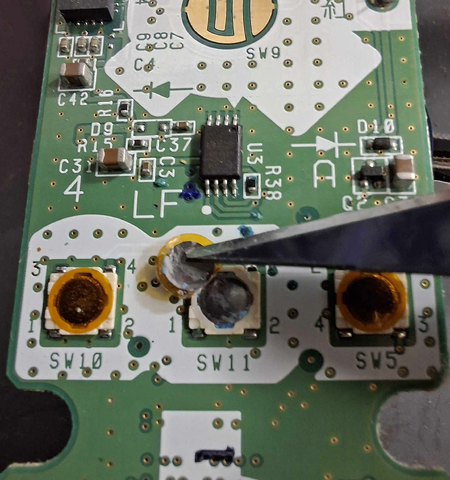
If your  /
/  /
/  /
/  is not clicky or is stuck, it may be corroded. These buttons consist of the plastic button frame, a holepunch-like metal foil pad, and a second holepunch-like foil pad connected to an adhesive yellow circle. You can try and fix it by:
- Using a razor to very gently lift the yellow circle's edge to lift off the top foil pad. Clean both the metal surface of the now-loose foil pad as well as the now-exposed surface with isopropyl alcohol and a cotton swab.
- Use the razor to very gently squeeze the second foil pad to one side so it pops out of the button frame. Clean both the new exposed side of the foil pad and the exposed button with isopropyl alcohol and a cotton swab.
- After it dries, reassemble the button by putting the loose foil back in the button frame. Put the foil attached to the yellow circle over it and press it down to stick the adhesive back on. With your finger, you should be able to depress the foil to make it click.
- Reassemble the controller and test if you can now actuate the button with a click and if the console registers the button press.
Checking Fuses
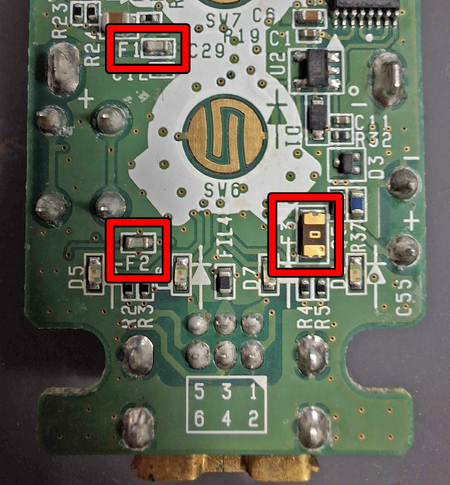
There are three protection fuses in the Wii remote, labelled F1, F2, and F3. Use a multimeter to verify continuity across each one. If any of them do not have continuity, replace them or remove the fuse and bridge the two pads. The correct fuse values are currently unknown.