This guide will walk you through the various methods and programs for extracting the files from an ISO image of either an original Xbox or an Xbox 360 DVD. Extracted files can be used to play your game from the external drive, and/or modifying the game files or the game's default.xex or default.xbe file.
You can also repack the game into an "XISO", where only the XDVDFS partition for the game files is on the ISO image without any of the padding, security sector, or video partition. XISOs can be used for either the Xemu emulator, or direct installation on an original Xbox with XISO attachers. You can also XISOs with ISO2GOD to create small GOD versions of games to be used on an Xbox 360, though it's a bit unnecessary most of the time, as ISO2GOD already has trimming options built-in.
xdvdfs
xdvdfs is a modern, more reliable alternative to extract-xiso, offering numerous options for managing Xbox and Xbox 360 ISO images.
Web App (Chromium Web Browser)
This is the easiest method of extracting & rebuilding games with xdvdfs, as it provides the user with a nice GUI. It's also compatible with many platforms (including Android and ChromeOS), since all it needs is a Chromium browser.
Unfortunately, this will not work on non-Chromium web browsers like Safari or Firefox due to them not fully implementing the file system API. Brave is a notable exception to this, but it can be easily turned back on with a flag.
Simply go to xiso.antangelo.com, click the tab labeled Unpack, and follow the on-screen instructions. Pack can be used to convert an extracted folder of a game or a "Redump" ISO back into an XISO, and Compress can also be used to compress a folder/ISO into a .cso file for usage with Project Stellar.
Command Line (Windows, Linux, & macOS)
- Download the latest binary for xdvdfs for your operating system.
- On a Windows machine, you can optionally add it to a folder in your PATH so you don't have to always point to the binary in the command line.
- On a macOS machine, or a Linux machine that isn't using an x86_64 architecture (arm64, MIPS, RISC-V, etc.), you may need to recompile the source code for your system, which requires you to install the Rust toolchain.
- This can be automated if the machine has an internet connection by typing
cargo install xdvdfs-cliin your system's terminal, which will download all the necessary components for xdvdfs and compile it for you.
- This can be automated if the machine has an internet connection by typing
- Run the following command for extracting the content from an ISO:
xdvdfs unpack <path to image> [optional output path]- You can drag and drop your ISO file or output directory into the command line to easily fill in the file paths.
- You can also replace
unpackwithpackif you would like to make the ISO directly playable with an XBE attacher or Xemu, or making an XISO from a folder. - If you would like to compress original Xbox ISOs for use with Project Stellar, you can instead type
compress.
extract-xiso
extract-xiso is an old yet decently trustworthy application that has the ability of either extracting the contents from Xbox & Xbox 360 ISOs, or repackaging an Xbox ISO to be in "XISO" format. There are also many GUI front ends available for extract-xiso, which is normally a terminal/command line application.
GUI (Windows)
XisoGUI by TheRealNextria
This front end also provides support for batch extraction.
- Download the latest XisoGUI and extract it to somewhere on your computer.
- Add the desired ISO files with the
Add files...button on the app. You can also clickAdd from folderin order to add every single ISO file that can be located in the selected folder. - Click
Runin the bottom left of the program to start the extraction process for all your ISO files.
KilLo445's GUI
- Download the latest extract-xiso-gui and extract it to somewhere on your computer.
- Click the "Browse" button and select the ISO.
- On the drop-down menu, change it to
Extract. Now you can click the bigGo!button to start the conversion.- if you would like to make the ISO directly playable with an XBE attacher or Xemu, select
Rewriteinstead.
- if you would like to make the ISO directly playable with an XBE attacher or Xemu, select
- Once finished, you can now copy the game folder to your Xbox 360 with USB or FTP.
dmug's GUI (macOS 11+ only)
- Download the latest extract-xiso-gui and extract the .app file to your
/Applications/folder. Right-click or Control+Click the application, click Open, and click Open again on the security warning. - Add the desired ISO files with the corresponding option in the application. It also supports batch functionality if you select a folder with ISOs as well.
- Add the desired output directory with the corresponding option in the application.
- Select the desired mode with the top selection box.
- Click
Executeto start the conversion process.
Huge's GUI
- Download Extract XISO GUI and extract the contents to a folder somewhere on your computer.
- Click
Extract XISOand select the game you want to extract. - Once finished, you can now copy the game folder to your Xbox 360 with USB or FTP.
Swizzy's GUI
- Download Exiso GUI from the link provided here and extract the contents to a folder somewhere on your computer.
- Select
Extract ISOas your operation. - Add your game by clicking the
Openbutton. You can also change where the game is extracted to by clicking theSavebutton below it. - Once you are ready, click
Okin the bottom left to start the extraction. - Once finished, you can now copy the game folder to your Xbox 360 with USB or FTP.
XBOX360 ISO Extract by somski
This front end also provides support for batch extraction.
- Download XBOX360 ISO Extract from the link provided here.
- Input the directory where all of your ISOs are kept, and enter the directory where you want the ISOs to be extracted to.
- Keep in mind that this tool expects each ISO in your ISO directory to each be inside their own folders individually. If you store each ISO file in one folder, the app will just try to extract the game files for every game you select direct into the output folder rather than creating an individual folder for the game.
- Select the ISOs you want to extract, and click the
Go!button. - Once finished, you can now copy the game folder to your Xbox 360 with USB or FTP.
Command Line (Windows, Linux, & macOS)
- Download and install the latest version of extract-xiso. You can optionally add it to your PATH so you don't have to always point to the binary in the command line.
- You may need to recompile the application if you have an Intel-based Mac on macOS, as the macOS binary release is built for ARM.
- Run the tool like this to extract here:
extract-xiso [optional output path] <path to image>- You can also drag and drop your ISO file or output directory into the command line to easily fill in the file paths.
- If you want the ability to convert original Xbox games to be compatible with an XBE attacher or Xemu, add
-rbefore the line that contains the path to your image.
- Once finished, you can now copy the game folder to your Xbox 360 with USB or FTP.
Other GUI Apps
Repackinator
Repackinator also features the ability to extract original Xbox ISO files, though it can't extract Xbox 360 XGD2/3 ISO files.
On Windows, you can simply just run Repackinator at least once as administrator, and its options for ISO management will be added to your right-click menu, including file extraction with Xbox ISOs.
Xbox Image Browser
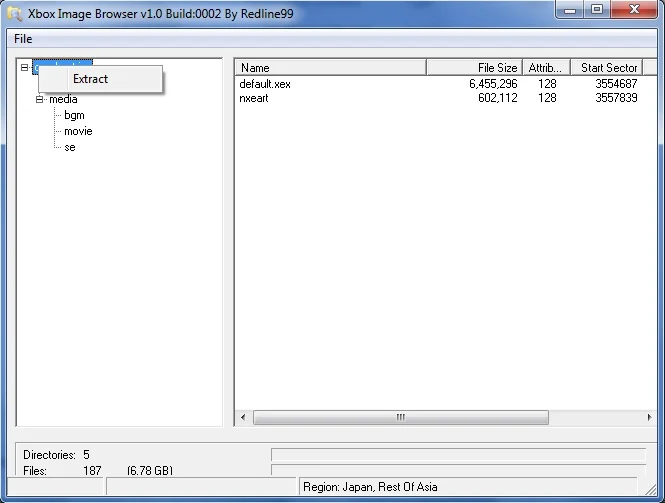
This is a simple Windows app that just acts as a file browser for XGD ISOs used for the original Xbox and Xbox 360. It can be quite useful if you want to install patched executables or only need to extract specific files from a game.
- Download and execute Xbox Image Browser 2.9.0.350.
- Click "File → Open" and select the ISO image file.
- Right-click the content and choose "Extract" as shown below.
- Select the output directory for your extracted files.
- Once finished, you can now copy the game folder to your Xbox 360 with USB or FTP.
Velocity
See the main article for Velocity for more details.
Qwix
Qwix is a simple application intended for the original Xbox that can automate the process of extracting and transferring XISO format games to an Xbox over FTP. It can even do basic media patches on xbe files in order to allow them to be played on the Xbox's HDD.