Page content & researching collaboratively taken from io55.net's Xbox One page with permission.
There are three retail Xbox One models. The original Xbox One had two motherboard revisions, but the only differences are minor component changes.
Retail Models
Models are arranged chronologically.
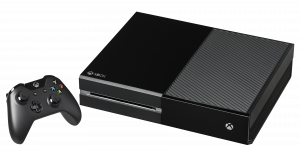
Xbox One - Model 1540 (2013-2015)
Code name: Durango (also known as Graybull)
The main upside to the original Xbox One (also nicknamed "fat", "phat", or "VCR") is the fact that they’re often cheaper on used markets than the other two versions, as they otherwise have the slowest gaming performance and the bulkiest form factor with the least power efficiency. While many “bundle” versions exist for this system, such as the Xbox One Elite, none of these versions change anything except the HDD (500GB HDD to 1TB HDD), very minor visual flair, startup and eject sounds (if it's a special edition), and what they came with upon purchase.
As for I/O, these systems all have on the back:
- Dual-barrel external power supply connector
- HDMI 1.4 input & output
- S/PDIF optical audio
- Two USB 3.0 ports
- Proprietary Kinect port (uses USB protocol but with extra power pins)
- 3.5mm IR output
- 2.4 GHz & 5 GHz 802.11n Wi-Fi support
- Gigabit Ethernet
- Kensington lock
The front has nothing except the slot-loading Blu-ray disc drive and capacitive eject/power buttons, while the extra USB port and controller sync button are on the left side.
Silverton (2015-2016)
The original Xbox One also received a minor motherboard revision code-named "Silverton" around May 2014. These models have the same functionality as the older Durango boards. It appears to just be a revision aimed to make the console cheaper to produce, although dumping the 8 GB eMMC requires a different method, and the SoC appears to have different security, though this remains unexplored.
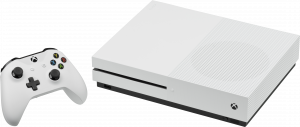
Xbox One S - Model 1681 (2016-2020)
Code name: Edmonton
The “Slimline” revision of the Xbox One, which surprisingly changes some of the internal hardware.
The rear I/O is the same (minus the Kinect port), while the third USB port and sync button were moved to the front. The Xbox One Kinect can still be used on the One S/X (and even PC) with an adapter that splits the proprietary port to a USB 3.0 connector and external power supply. The power and eject buttons were changed to be mechanical rather than capacitive. The power supply also became integrated into the system, whereas the original Xbox One had a large external power supply like the Xbox 360.
Furthermore, the HDMI output has been upgraded to 2.0, the Wi-Fi chipset was enhanced with 802.11ac support, the AMD SoC received a minor spec bump with the manufacturing process shrunken from 28 nm to 16 nm, and the IR blaster became integrated with the system. The minor upgrades to the SoC allowed for adding HDR with slight performance improvements and higher power efficiency, though it also has increased protection against glitch attacks.
There is an “All-Digital” version of the S, which is completely identical to the normal S except for its lack of a Blu-ray disc drive. Due to the Blu-ray disc drive controller being tied to the console's NAND and SoC with unextractable keys, it is impossible to add a disc drive to an all-digital version of an Xbox One S at this time.
Xbox One X - Model 1787 (2017-2020)
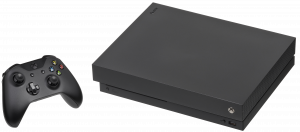
Code name: Scorpio
A major hardware upgrade to the Xbox One family.
When it comes to I/O and form factor, the X is similar to the S while being a bit smaller, although the S is slightly lighter due to simpler internal cooling.
However, the internals have been drastically upgraded, as it now has a total of 12 GB of GDDR5 RAM (as opposed to the 8 GB DDR3 in the previous Xbox One models), extra CPU/GPU power, a solid-state hybrid drive in the 2 TB SKU, and more. Aside from using an Xbox Series system, the Xbox One X is the best model for playing Xbox One games because of the extra power, especially at 4K, and backward-compatible games have additional Xbox One X enhancement options (although these are also on the Xbox Series X/S through their Xbox One backward compatibility).
Outside of this, the X functions the same as the S and "phat" models when it comes to emulators and homebrew due to the CPU still being very slow, but up-scaling to high resolutions in emulators may be better on this model.
Note About Blu-ray Disc Drives
Blu-ray disc drives on all Xbox Ones cannot easily be swapped, due to the Blu-ray disc drive's controller chip on the drive daughterboard being tied to the console's NAND, which is encrypted with the SoC. Since methods of extracting and changing the keys are unknown, it is impossible to remarry a drive PCB to another console with software or hardware flashing methods.
To use a new drive, you have to swap the original console's drive daughterboard to a new drive of the same model. It may also be possible to desolder the drive controller chip to another PCB if the original PCB is defective.
Unfortunately, like the PlayStation 3, 4, & 5, the Xbox One's operating system requires the drive controller to be connected and working to perform successful system updates. If the Blu-ray disc drive's daughterboard is not working or not connected, the console will show an E100 error code after an update attempt. If a console's drive has a defective PCB (or even the rare chance the controller itself is bricked) and a dead hard drive, the console is permanently bricked!
A curious note about launch-day Xbox Ones is that the disc drive firmware is unlocked from the factory; the Day One update (and any future updates if one somehow comes across one of these Xboxes that never had any update installed) is what locked the drives to the console it's connected with to utilize game discs.
References
https://news.xbox.com/en-us/wp-content/uploads/sites/2/Xbox_One_Spec_Sheet.pdf
https://consolemods.org/wiki/File:NP1SJm1.jpeg (back IO for originals)

https://xboxoneresearch.github.io/wiki/retail-xone-skus/
https://en.wikipedia.org/wiki/Xbox_One
https://xbox.fandom.com/wiki/Xbox_One
https://xbox.fandom.com/wiki/Xbox_One_S