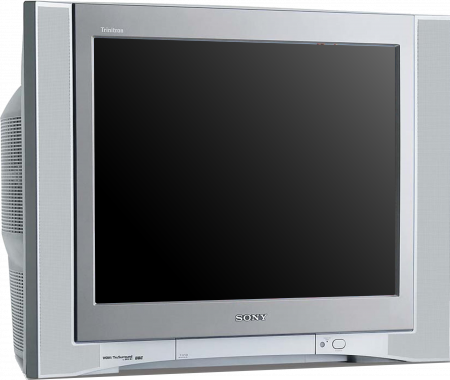
| Information | ||
|---|---|---|
| Manufacturer | Sony | |
| Type | Consumer | |
| Tube Series | FD Trinitron | |
| Size | 36" | |
| Regions | NTSC | |
| 240p/480i | Yes | |
| 480p | No | |
| 720p | No | |
| 1080i | No | |
| Vsync | 60hz | |
| Widescreen | No | |
| Composite | 1x front / 2x rear | |
| S-Video | 1x front / 1x rear | |
| Component | 2x YPbPr | |
| Dimensions | Width: 1020mm
Depth: 640mm Height: 760mm | |
| Weight | 224 lbs, 14 oz | |
| Links | ||
| Chassis | BA-5D | |
| Remote | RM-Y181 | |
| Operation Manual | FV310 Manual | |
| Service Manual | BA-5D Chassis Manual | |
| Brochure | FV310 Brochure | |
The FV310 series are oft regarded as Sony's "best" SD televisions in the North American market. Their defining feature is an entirely redesigned and beefed up power supply section which provided considerably better voltage regulation and results in a notably more consistent and clean image, with greatly reduced breathing (raster size variation) blooming (spot size variation) and general clarity as a result.
Accompanying this better voltage regulation is a more robust audio arrangement featuring better arranged/treated (but lower rated) 7.5W speakers paired with a 15W subwoofer, which it shared with the FV300 models that preceded it.
An RGB mod for the BA-5D chassis the FV310 are built on can be found here.
Fixing the WEGA Bow
 | This adjustment requires touching components on the yoke with the TV powered on. You must avoid touching anything but the adjustment rings or risk a high voltage shock. |
Often times WEGA CRTs develop the "WEGA Bow", that is bowing or drooping of the image, especially visible near the top of the screen. This issue applies mainly to the larger sets, such as the KV-36FV310 and service menu adjustments generally do not fix the issue. Luckily, many of the larger sets have adjustment rings on the yoke specifically for this issue. Note that is the set of two rings that are further away from the body of the tube and NOT the set of three or more rings used for color convergence.
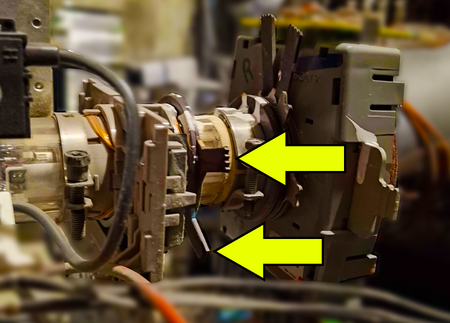
To adjust them, the TV must be on and you must turn each ring trying to dial in what position looks best. There is likely epoxy over the rings and you will need to pinch the ring tabs toward each other to break them free before you can make adjustments. It's strongly recommended to have a second person watching the front of the screen to tell you what position looks the best in real-time.
Once a good position is locked in, it's recommended to use a white marker or paint to draw a line across the rings so that you know the position they were last in if you ever need to make an adjustment again.