The controller port PCBs in older PAL SNES consoles have four additional diodes for ESD protection placed on the data latch and clock lines (pins 2 and 3) of the controller ports. To compensate, PAL SNES controllers have pull-up resistors on these lines. NTSC SNES and Super Famicom controllers do not have these pull-up resistors, and will therefore not work on these PAL consoles. Thankfully, with trivial modification, any SNES or Super Famicom controller can be used with these PAL consoles.
 | This mod does not apply to PAL 1CHIP consoles, as they use the same controller port board as the Super Famicom. |
Materials and Tools
- 4.5mm gamebit screwdriver
- Soldering iron
- Hookup wire or cut-off component leads (such as those from a resistor or capacitor)
- Leaded solder
- Desoldering braid (optional)
- Flush cutters
- Wire stripper
Procedure
- Flip over the SNES and unscrew the six 4.5 mm gamebit screws securing the case. Remove the top case and set it aside.
- Remove the controller port PCB by carefully pulling the ribbon cable out of its connector on the SNES motherboard.
- Looking at the rear of the controller port PCB (with the solder joints facing you), locate the solder joints of the four diodes on the PCB. Using wire or cut-off component leads, bridge the two points of each diode.
- Alternatively, the diodes can be desoldered and replaced with wire or jumpers made from component leads. The controller board can be removed from the ports themselves by desoldering the seven pins on each port, then pushing in the two plastic clips. Doing this will provide you with more room to work with.
- Reconnect the controller port board and place it back inside the console. Reassemble the SNES and test with an NTSC controller (either a US SNES or Super Famicom controller will work). The NTSC controller should now function, and PAL SNES controllers will also continue to work normally.
-
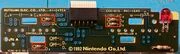 A controller board from a PAL SNES, with the diodes to be bypassed highlighted in red boxes.
 -
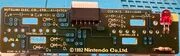 The same board with the diodes replaced with jumpers.