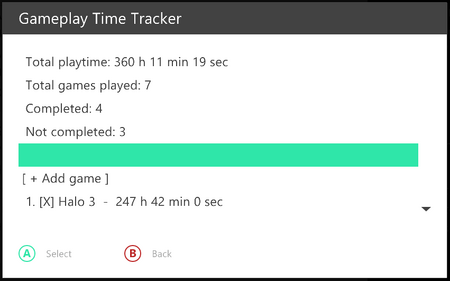
Gameplay Time Tracker (source) is a script by created by Mz1ceW paired with a boot plugin by Derf which tracks your individual playtime in games. Simply install the included XEX as a boot plugin and the GameplayTimeTracker as a utility script, and it will track the games automatically, and you can view the results in the Gameplay Time Tracker script.
Features
- Tracks time for Xbox 360 games, original Xbox games, and Games-on-Demand (GOD) games.
- Shows the running total of all games.
- Allows you to manually mark games as complete.
- Allows you to hide games (e.g. homebrew tools).
- Allows you to set the time for a game (e.g. if you know you have ~200 hours in Skyrim, you can enter 200 hours).
Caveats
- Aurora must be installed in
HDD1:\Aurora\orUSB:\Aurora\. - Game must report a title ID to be tracked (e.g. homebrew usually is title ID 00000000, so it will not be tracked).
- Powering off your console using the power button will cause the last game time to only be accurate to within 5 minutes — if you know a way to hook physical button shutdowns, please send me a working example!
Installation and Usage
Note that both the boot plugin and script need to be setup.
- To install the Gameplay Time Tracker script, you can download the files from ConsoleMods, extract them and put them in your scripts folder, located at
User\Scripts\Utility\where Aurora is installed. Alternatively, it is also available in the Homebrew Store under the "Aurora Scripts" section. - Launch DashLaunch and set GameplayTimeTracker.xex as a boot plugin and save. It is located under
User\Scripts\Utility\where Aurora is installed. - Upon next reboot, the tracker will be active in the background and log any time spent playing games. Launch the script whenever you want to see the time played stats.