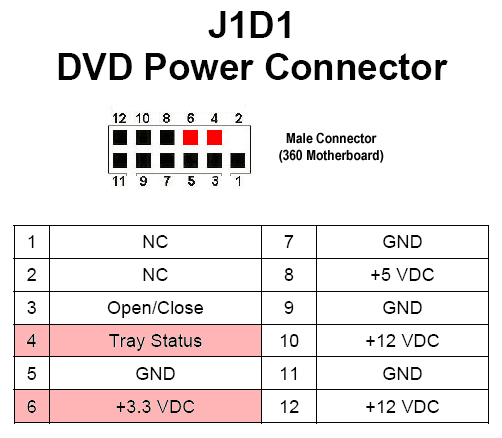
If you remove the DVD drive on any Xbox 360, the console will function normally, but the power LED will flash indefinitely as if you are ejecting the disc drive.
Stopping Blinking LED (RGH/JTAG)
Disable the DVD drive in your XeBuild image with the nosmcblink and/or nodvd patches in J-Runner with Extras (they will be in the Advanced XeBuild Settings menu), and flash the NAND image. If you ever want to replace the disc drive with a functioning one, you will need to flash a new image with the DVD drive enabled.
Stopping Blinking LED (Stock Console)
Following this diagram, bridge pin 4 (tray status) and pin 6 (3.3V). This will stop the blinking of the power LED.