 | This process is dangerous and potentially can brick or fry your Xbox. It involves soldering a very small contact, so it is recommended to be experienced with soldering before proceeding. |
Feature Sets
Xecuter 3 Features
- Purple board color
- Comes from factory pre-flashed with FlashBIOS utility
- 2MB Flash ROM; can set up 8x256k, 4x512k, 2x1024k or a single 2048k banks
- Dedicated 256k Backup ROM (can be upgraded)
- i2c Bus for X3 Config LIVE!
- New Enhanced I/O Bus for Full LCD support and add-ons
- Flash Protection Control
- Mod Enable - Quick Press Power to boot from 2Mb Flash ROM (External LED will indicate BLUE LED)
- Mod Disable - Press Power >1 second (External LED will indicate RED LED)
- Quick Press Power+Eject >1 second to boot from 256k Backup ROM (External LED will indicate PURPLE LED)
- HDD and LAN Activity LEDs
- D0 Control (Disable Mod Via Software)
- X3 works without any switch accessories connected
- No-Solder Pogo Pin Install option available
- Emergency external programming interface
- Compatible with all BIOSes
- Compatible with Xapt3r solderless installation module
LCD-Specific Features
- Custom text Display on boot
- Display X3 Config Live Version
- Display Dip switch and selected BIOS
- XBMC and Avalaunch LCD features are compatible
Xecuter 3CE Additional Features
- White and red board color
- Alternating 5V connector, which prevents the modchip from always being on when the Xbox is off in version 1.6 Xboxes
- XLCD connector is a right angle instead of straight
Documentation
Guides
Full Installation Guide (Xecuter 3)
Full Installation Guide (Xecuter 3CE)
Video Installation Guide (MrMario2011)
Video Installation (ModzvilleUSA)
LPC Rebuild guide
Required for 1.6 Xboxes if you don't have a QSB. LFRAME acts as the "D0" wire on 1.6 motherboards, so you can connect the #8 cable's D0 pin to LFRAME directly rather than connecting it to the LPC.
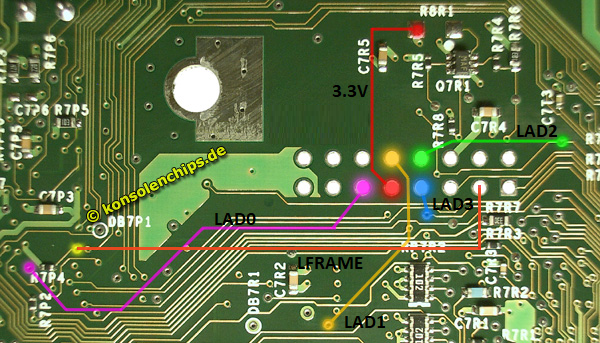
Recommended Switch Location
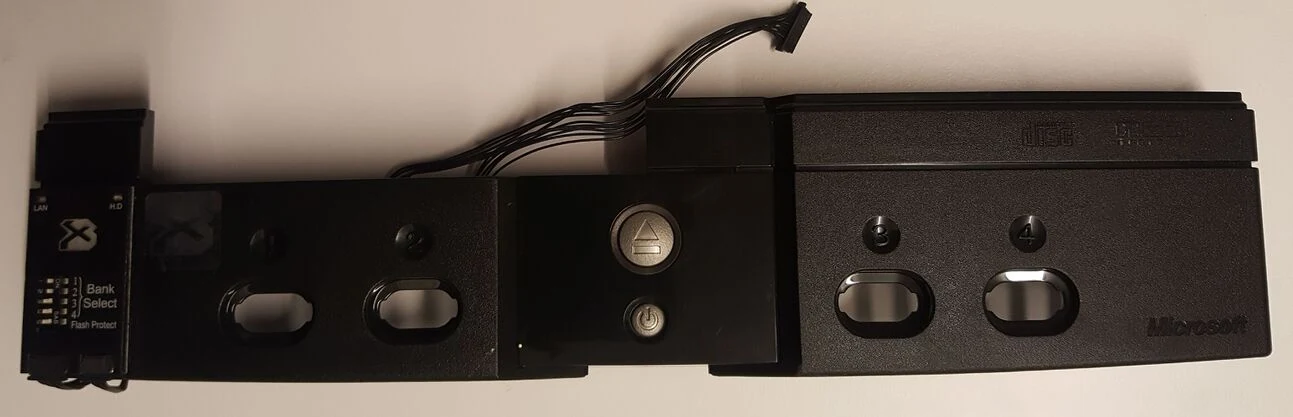
BIOS Bank Switch Reference
256k Bank
Bank 1: on on on on
Bank 2: off on on on
Bank 3: on off on on
Bank 4: off off on on
Bank 5: on on off on
Bank 6: off on off on
Bank 7: on off off on
Bank 8: off off off on
512k Bank
Bank 12: on on on off
Bank 34: off on on off
Bank 56: on off on off
Bank 78: off off on off
1MB Bank
Bank 1234: on on off off (Set the bank switches to this when flashing the X3 BIOS for the first time with FlashBIOS)
Bank 5678: off on off off
2MB Bank
Bank 12345678: off off off off