Early Xbox 360 models have issues with heating and cooling cycles, contributing to the Red Ring of Death issue in many consoles, as described by Microsoft in the Power On documentary. Normal temperatures vary from model to model, but are typically between 71-83C. There is no reason to adjust the thermal targets or otherwise modify the cooling system, as this will only make your Xbox needlessly loud. There are many myths about the 360 having cooling issues, but they are not true and have been heavily debunked. The 360's that failed in mass, failed due to defective flip chip manufacturing of the graphics chips. For more info, see this article at BadCaps.net.
 | Some guides recommend "delidding" the CGPUs found on Xbox 360 S/E models for better temperatures. While this may lower temperatures, it's extremely easy to mess up the process and permanently damage your console. It is considered a last resort method if thermal paste does not bring your console back to normal temperatures. It will not be covered here. |
Recommended
Replacing Thermal Paste
This process involves opening your Xbox 360, removing the heatsinks, removing the old thermal material with isopropyl alcohol, and applying a new pea-sized blob of thermal paste. It's often easiest to get the old thermal material off by heating it with a hair dryer, and swiping it off with a coffee filter or Q-tips. That being said, you may not need to use external heat on the S/E models, since they just use normal paste. If you're working on a phat console that still has the original phase change thermal pads, you can also use brake cleaner, Goo Gone, or ArctiClean in order to easily remove it without using heat. Keep in mind that, unless your thermal paste is conductive, too much is better than too little paste. This is the only modification you should consider, as it will bring your console back to manufacturer specifications.
Not Recommended
| These methods are NOT recommended and only listed here to acknowledge their existence. If you have a GPU with the flip-chip manufacturing issue, it will fail regardless of cooling tricks, and these tricks may stress system components. The engineers designing the cooling system used lots of thermal modelling to determine the configuration, and tampering can often worsen cooling performance rather than helping, or cause the console to be unnecessarily loud. |
Adjusting Thermal Targets (JTAG/RGH/XeUnshackle)
 | While not dangerous, this is unnecessary and only will make your console louder. |
It's best to set your desired fan settings in DashLaunch, because it keeps them applied no matter what dashboard or app/game you are in. Open DashLaunch and navigate to Miscellaneous > System Info > SMC Config Settings, and set a lower target temperature for your GPU and EDRAM. The optimal value is different per system, but it's generally recommended to choose target temperatures below 70°C that don't run the fan too loudly. You can also set the fan at a certain percent instead with the fan override settings, but this is not recommended and doesn't permanently change the fan settings upon rebooting anyway.
Fan Voltage Mods
| While not dangerous, this is unnecessary and only will make your console louder. |
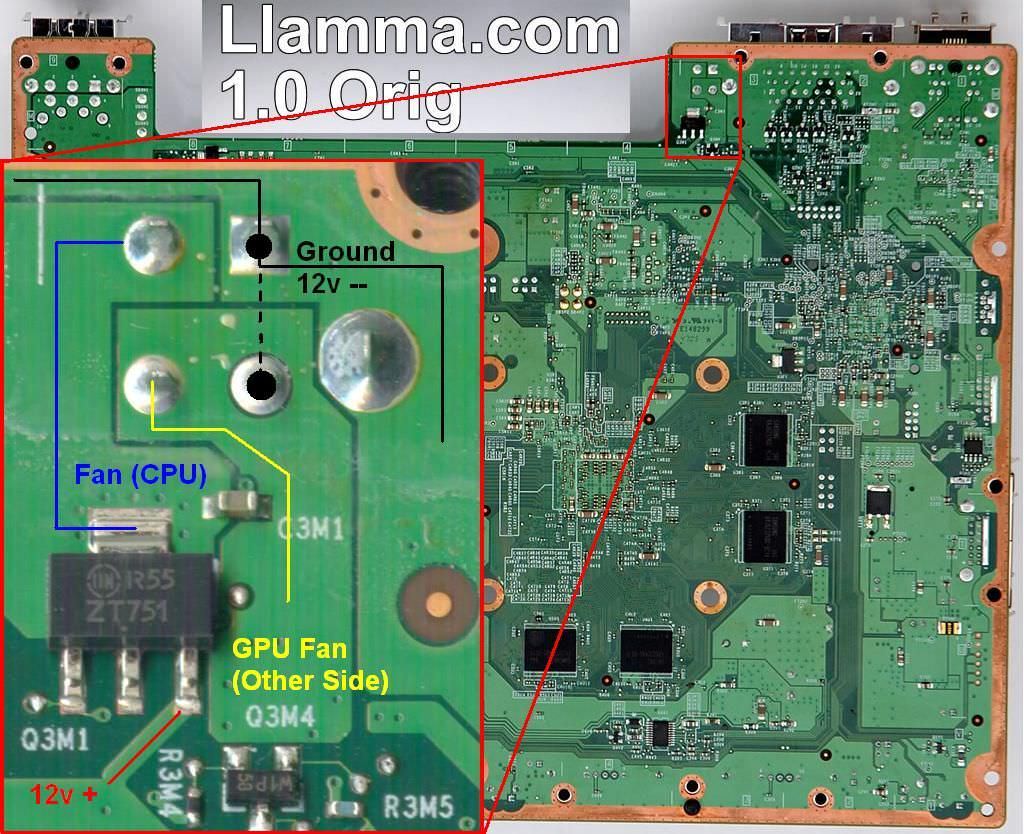
On stock consoles, you don't have the option to adjust fan speeds unless you boot Bad Update. However, some people will wire their fans to a 9V or 12V power source inside their console to always run the fan at 75% or 100%. GameStop would refurbish consoles and often wire the fan to the 9V DVD drive power cable. To do the 12V fan mod, one would solder a wire from the "Fan (CPU)" point to the ground point next to it, and soldering a second wire from the "GPU Fan" point to the ground point using this diagram.
Heatsink Airflow Modification
Some people have covered the top of the heatsinks with aluminum foil and keeping it anchored by folding slightly over the edges or using electric tape to anchor the foil on the shroud. Do not block the open end of the heat sink. For the GPU, due to it being shorter and having less air intake than the CPU heatsink, you should only cover about half of the top of the heatsink so that it can pull in more air.
| Restricting airflow by forcing it through the end of the heatsink can cause a pressure drop through the heatsink (especially the GPU) causing temperatures to rise, requiring the system to run the fans faster to compensate. The upper casing and DVD drive maintain sufficient pressure through the CPU/GPU heatsinks respectively without causing this pressure drop. |
You can replace the GPU heatsink with a CPU heatsink, and cut a hole in the fan shroud so that you can use foil as part of the shroud to pull air from the entire height of the heat sink. With a second CPU heatsink, there will not be any room for a DVD drive, so this would be best on an RGH/JTAG console or on a system with an ODE. You may also want to see this page for your options to stop the power LED from flashing indefinitely.
| Only use the Aluminum CPU heatsink if doing this, as the copper one is not wide enough to cover the eDRAM, but may cover enough to "fool" the thermal sensor. |
Adding Extra Fan(s)
Often times, people will add extra fans to their console. Popular spots are:
- A single one on top of the CPU heat sink, blowing out of holes cut in the side of the case
- A fan in front of both the GPU and CPU heat sinks to blow air through the heatsinks into the white sheathing and out of the regular fan vent
- A external fans mounted directly outside the fan vent - note that most of these products usually draw power from the console power plug and are known to damage hardware
Adding Heatsinks
| Adding extra heatsinks is highly discouraged as the heatsink can come loose and cause a short circuit, and offers ABSOLUTELY NO BENIFIT due to the low TDP of these chips. Especially the Southbridge and ANA/HANA, with TDP's of only 1-4W depending on the chip, making adding a heatsink completely pointless. |
Occasionally, RROD is caused by RAM chip failures. Some people have added copper RAM heatsinks to each RAM chip, despite the fact that this does not affect RAM chip reliability. The heatsinks generally come with a thermal adhesive on them and do not need thermal paste.
- On the top side of the motherboard, there are two accessible Samsung/Qimonda/Winbond RAM chips that can use regular RAM heatsinks.
- On the top side of the motherboard, there is the HANA chip that can use a regular RAM heatsink.
- On the top side of the motherboard, there is the Southbridge chip, which has the Xbox 360 logo and "PSB", "KSB", or "XSB" on it, that can use a regular RAM heatsink.
- (Early Phats) On the bottom side of the board, there are four Samsung/Qimonda RAM chips which can have flat heatsinks applied on them to clear the height limit.
| Some people have also added thermal paste to the RAM chips covered by the GPU heatsink, but this is pointless as the chips will NOT (and should NOT) make contact with the GPU heatsink. |