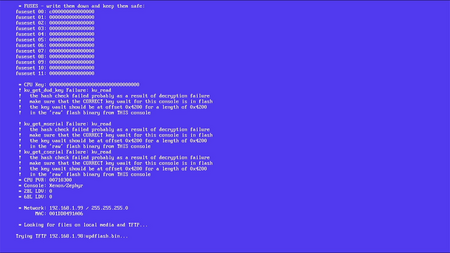
Zero-fuse consoles (also called "0 fuse" or "0f" consoles) are Xbox 360s that have a CPU that was never attached to a console during the production process. Essentially, they are unsecured CPUs that never had their eFuses burned to lock it down to be a retail console, test kit, or development kit. Many of these CPUs have surfaced over the years, particularly phat model CPUs, and they can be used as a replacement CPU in a retail console.
Since they are essentially a blank slate, you can configure them in a couple of ways:
- NOTE: Do not burn the fuses on the CPU. By doing so, you are turning a unique unsecured CPU into just another random locked down processor.
- As a retail-like console running DevGL. This is essentially the stock operating system modified to remove security checks, very similar to freeboot — the software that runs on JTAG/RGH consoles. This preserves the eFuses, retaining the zero-fuse status.
- As an XDK-like console running XDKBuild or RGLoader. This is essentially the development operating system modified to remove security checks. RGLoader even has additional features that made it more like the DevGL or freeboot experience, such as plugin support and booting retail signed software. Either option preserves the eFuses, retaining the zero-fuse status.
While zero-fuse consoles behave similarly to an official console with the target configuration, they do have one unique feature. Due to the CPU being unsecured, CPU-level debugging is enabled. This is a very low level debugging feature available via the JTAG interface, which is normally turned off even for official XDKs once eFuses are burned.
Extracting SB_priv.bin and enabling DevGL
To be able to create a DevGL image, SB_priv.bin (the key used to sign the 4BL) must be obtained and placed in \JRunner\xeBuild\common\ (NOT \JRunner\common\).
In J-Runner with Extras 3.4.0 r4 and later, a new Enable DevGL command was added under the Advanced menu that will automatically extract SB_priv.bin from an SDK located on the same machine.
If an SDK installation was not found, J-Runner will prompt the user to select one of the following files that contains SB_priv.bin:
- SDK installer (XDKSetupXenon*.exe)
- content.dll from the SDK
- A previously extracted SB_priv.bin
SB_priv.bin will then be extracted, validated, and installed in the proper location.
Building a DevGL Image
If you want to run DevGL, you have the option to create a DevGL image using J-Runner with Extras.
J-Runner With Extras version 3.4.0 and later includes DevGL patches for 1888, 6717, 7258, 9199, 13604, and 15574, in addition to 17559. Sources for the zero fuse 6717, 7258, 9199, 13604, and 15574 patch sets are found here on GitHub
For XDKBuild and RGLoader, refer to the Converting to a Devkit page for instructions.
- DevGL must be enabled by installing SB_priv.bin. Refer to the previous section.
- Launch J-Runner. The DEVGL option should now be available on the right-hand side under the XeBuild area. If you load a zero-fuse DevGL NAND, it will now detect it as a DevGL NAND.
- Check the "0 Fuse" box.
- Build your image as needed and flash it.
Pre-Made Images
Any of the following images can be directly flashed onto your zero-fuse console without any modifications. However, if you want the DVD drive to function, you will need to open it in J-Runner with Extras, input the CPU key that came with it, click Nand > "Patch Keyvault...", and enter the DVD key and model. If you do not know the model number, you can find it listed in XeLL.
XDKBuild
Note that XDKBuild itself cannot play retail game discs, but having the correct DVD key may be useful if you shadowboot into a retail kernel.
- Xdkbuild zero-fuse jasper bb.zip - CPU Key: F37C0CD50B928F4E67614ACD548A4E49