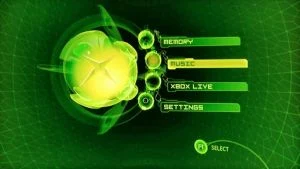
The Microsoft Dashboard (often referred to as just the MS Dash) is the menu system software initially loaded from the hard drive of all stock original Xboxes. Unless the system is modified to load an alternate dash, it'll automatically launch whenever the system is started without a game disc inserted. It offers system configuration options, save management features, and can both rip and play audio CDs. If an Xbox DVD Movie Playback Kit dongle is connected to the system, it furthermore gains video playback functionality.
Unlike most all unofficial dashboard options, the MS dash doesn't offer any FTP services, direct file management functions, nor the ability to launch other applications from the console's HDD. To gain such features a console must be modded. After modding, an Xbox will usually be configured to boot directly to a less restrictive dash - although modern mods still allow the MS dash to be launched whenever need be.
A modified version of the MS dash exists known as UIX Lite which patches the dashboard for allowing more customization, and adding a title launcher.
Menu Structure
Memory
Primarily used to manage Xbox Game Saves.
Storage is measured in "blocks", where each "block" is a single 16KB cluster. There are 313,280 blocks in all, representing about 4.78GB of real space on the console's E partition. The MS dash will claim that the HDD has "+50,000 blocks" (~781MB) available so long as the actual free amount exceeds that figure. In addition to game saves, your ripped music, updates, and DLC files are all stored on this same volume.
Xbox Memory Units can be inserted into wired Xbox game controllers in order to transfer data from system to system. They're essentially USB thumb drives: the controller sockets on the front of the system operate as USB v1.1 host ports, and the controllers themselves contain USB hubs. With a suitable adapter, many generic thumb drives can be connected in place of official Memory Units, which is helpful when softmodding Xboxes using exploited game saves. Note that the MS dash will immediately attempt to format any recognised storage device that hasn't already been prepared for use as a "Memory Unit"! A notification will only be displayed after it has successfully done so.
Some games sign their saves against each Xbox's unique HDD key. The MS dash will not allow such saves to be copied to Memory Units, and even if they are transferred to another system (through the use of a different, less limiting dash for example), their associated games will refuse to load them as-is - they must either be resigned against the new system's key, or the key itself must be transferred over into the new system's EEPROM. For some such games, patches do exist which can disable signature checks.
Music
Here CD Audio discs can be played, and even dumped to the console's HDD.
Certain Xbox games are able to access the stored music library and may make use of your songs in-game. For example, the GTA titles offer an additional car radio channel that simply plays through any locally stored music tracks.
Behind the scenes, music is stored within E:\TDATA\FFFE0000, on the same volume in which regular saves and DLCs are kept. WMA8 encoding is used, and each song must additionally be indexed within the E:\TDATA\FFFE0000\music\ST.DB database file in order to be recognised by games or the MS dash.
The MS dash is thus far the only Xbox-based application that can manage the soundtrack database. Other programs such as XBMC or DVD2Xbox can dump CDs to more common formats, such as MP3 or OGG (and additionally, XBMC can even play music and other media types over a network) - but such files can't be played by retail games. On a PC, the Xbox Soundtrack Editor application can instead be used to manipulate the database of an Xbox connected over FTP, allowing tracks to be added without the need to manually insert physical audio CDs.
Xbox Live
Used to manage the console's online services. Accounts could log in and download additional game content in the form of DLCs, or participate in multiplayer games over the internet. The Xbox Live servers were closed to original Xboxes on the 15th of April 2010.
Although the original Xbox Live servers are no longer available for first-gen systems, modding techniques can now be used to allow connections to Insignia, an Xbox Live replacement service. Xbox Live content can also be downloaded using the homebrew Mimesis application.
Older versions of the MS dash lack the Xbox Live menu entry, signifying that they could use an update.
Settings
The MS dash can reconfigure various system settings: many games refer to these instead of offering configuration panels of their own. Most values changed through this dashboard are saved into the console's EEPROM chip, and will persist even if the attached HDD is wiped. Network and other Live-related settings are an exception, and are kept in the Config Sector of the current HDD instead.
Although other dashboards offer settings of their own, most do not save them to the EEPROM or config sector, and instead keep them in their own installation folders where they won't affect any other games or apps. Also note that the use of a virtual EEPROM, an optional NKPatcher feature which is enabled by some older softmod installers, may prevent the MS dash from correctly saving new settings.
Clock
Basic time and date settings. The system clock continues to run when the console is turned off, and if no mains power connection is available then it falls back to a supercap instead - although this only holds a few hours' worth of charge at a time. Because of its tendency towards leaking, the clock cap is best removed from all pre-1.6 consoles.
Language
Games with alternate language data will refer to this setting when selecting which to use. NTSC games tend to only offer English, but PAL releases often include French, German, Italian, and Spanish localisation data as well. NTSC-J games are usually in Japanese only.
Audio
If nominally supported by the cable in use (i.e. excluding the official RF modulator), the 2-channel analog output can be switched between mono/stereo/matrixed Dolby. If a cable officially supporting S/PDIF is connected, the options to independently enable Dolby Digital and/or DTS will also be affective. Refer to Xbox Audio Information and Comparison of Game Consoles by Sound Capabilities for more information.
Video
The available display options vary according to the video region of the console (PAL, NTSC, or NTSC-J), which is set within the system's EEPROM. Although the MS dash itself does not allow a user to change an Xbox's regional config, modded console owners can easily do that using homebrewed tools such as:
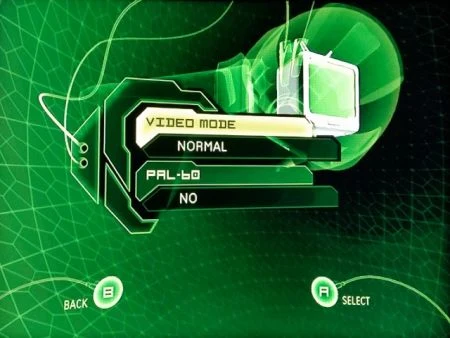
A PAL system only has access to SD PAL (576i@50hz) and, if an RF modulator is not being used, PAL60 (480i@60hz). NTSC consoles using lower-grade video cables are similarly limited to 480i@60hz only. To access HD, an NTSC system must be used together with a component (YPbPr) cable or a suitable adapter: this opens up settings offering 480p, 720p, and 1080i. Refer to Video Cables and HDMI Output for more info.
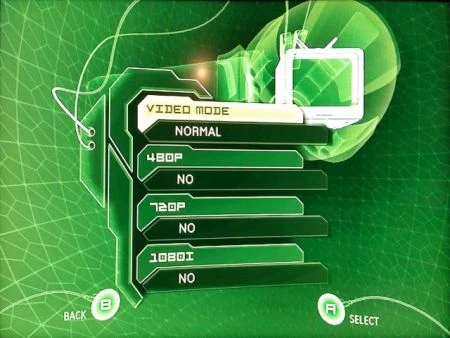 |  | 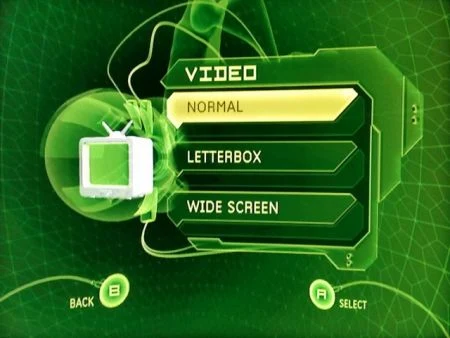 |
Other applications (official or otherwise) can only access HD display modes if they've first been enabled through a tool such as the MS dash. Note that even if HD display modes are enabled, applications may still opt not to use them. Likewise, many games will render in a 4:3 aspect ratio even if the system is set to widescreen (16:9). Refer to Games with Alternate Display Modes for more information.
Network
Intended for use with the (now defunct) Xbox Live service, the Microsoft dashboard's network config screen does not affect System Link Games (which do not use TCP/IP), nor most other dashboards (which tend to make use of their own IP settings). Notably, the MS dash does allow the console's MAC address to be changed, and it also offers a configurator for the official (and sorely obsolete) Xbox wireless network adapter.
In modern times, the Microsoft dashboard's network config screen is now primarily used to set up a console for use with Insignia, the third-party Xbox Live replacement service. Refer to Online Play for more info.
Auto Sign-In
Games with Xbox Live functionality will automatically attempt to sign in if enabled.
Parental Control
Allows games (American systems only) and movies (except for European consoles) to be locked behind a passcode. Different age ratings can be selected.
If an unknown passcode is already set, it can be overridden by entering  X ➤
X ➤  Y ➤
Y ➤  Left Trigger ➤ X in sequence. To remove the passcode entirely, then select Set Pass Code and simply press A again instead of entering a new button sequence.
Auto Off
A basic 6-hour inactivity poweroff option is available. If enabled, the timer will run regardless of which games or other applications your Xbox is running: best to turn it off before starting a lengthy File Transfer Protocol (FTP) session!
System Info
Provides a scrolling informational panel and the ability to factory reset the system. Most lines are just credits and legal disclaimers, although at the end K (kernel, aka BIOS) and D (MS dash) version numbers are displayed.
File Structure
The following files and folders make up the MS dash:
   💽 C
   ├📁 Audio
   ├📁 fonts
   ├📁 xboxdashdata.xxxxxxxx
   ├📁 xodash
   ├📄 XBox Book.xtf
   ├📄 Xbox.xtf
   └📄 xboxdash.xbe
The actual title of the "xboxdashdata" folder varies depending on the specific MS dash version that's installed. Refer to XboxDevWiki.net for a more detailed file listing.
An unmodified Xbox console will execute C:\xboxdash.xbe at the end of the BIOS initialisation process, starting the Microsoft dashboard. Softmodded consoles still do the same, although depending upon the particular softmod in use, the original executable file may or may not be replaced with a different Microsoft-signed executable. Certain additional support files (usually those within the fonts folder) are replaced with exploited versions which "trick" the system into loosening its DRM restrictions and then have it pass control to an entirely different XBE.
Older softmods hence make it difficult to launch the MS dash in its "natural" state. Since a complete second copy can't load from a different path (the dash is hardcoded to read its fonts etc from the C volume), other workarounds had to be devised. For example, NKPatcher's "ShadowC" function hides the true C partition in which the exploited files are placed, instead mounting a virtual C from which a user can manually load clean versions when desired.
Hardmodded consoles skip past C:\xboxdash.xbe during their boot process, instead launching an alternate executable (usually C:\evoxdash.xbe), and only falling back to the original if no other options are available. This means an unmodified copy of the MS dash can simply be left in place on the true C volume.
The UnleashX dashboard also makes use of the MS dash's Audio folder, and will become silent if it's not accessible.
Updating
All Live-compatible game discs contain files that can be used to update (or in some cases, completely restore) the MS dash. Starting the game and then attempting to have it sign into the Live service will trigger the update check, and your missing / outdated dash files will be replaced as need be. Although Live is an online service, a network cable need not be attached to install an on-disc update.
The final (and recommended) dash version is 5960, which can be obtained from any of these game discs.
Note that older softmods may be broken if you make a dash update attempt, in which case they would need to be re-installed afterwards. Modern mods typically prevent update checkers from running at all.