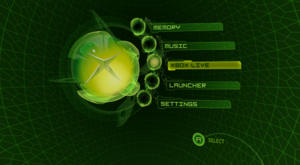
UIX Lite is a dashboard for the original Xbox. It is a collection of patches and XIP edits that adds community features to the stock MS Dash 5960. Originally launched as UIX Ultra Lite during the revival of Insignia (the Xbox Live replacement service), it was rebranded to UIX Lite by August 2024 and became the mainline TeamUIX project. The latest version is v0.5.
UIX Lite is part of the broader TeamUIX ecosystem, which also includes Theseus (a reverse-engineered reconstruction of the dashboard engine) and UIX Desktop (Theseus running natively on PC).
History
UIX (User.Interface.X) was originally released in 2003 as a source-level modification of the Xbox dashboard by JbOnE and the original TeamUIX collective. In 2020, during the COVID-19 pandemic, parts of the original Xbox source code tree and snippets from earlier mods like XboxDashNext (tHc Final) were rediscovered, sparking a revival. UIX Ultra Lite was introduced as a streamlined game launcher for the 5960 dashboard, designed to preserve Xbox Live (Insignia) compatibility while keeping the original aesthetic. By August 2024 it had evolved significantly and was rebranded as UIX Lite, becoming the team's mainline project.
Earlier projects in this lineage include tHc, tHc Lite, TrueBlue, BlackStormX (BSX), User.Interface.X, and Dash2GAM. Contributions from JbOnE, Gcue, the Xbox-Scene forums, and the xboxdash.net community were foundational to both UIX and TeamUIX.
Features
UIX Lite adds the following to the stock MS Dash 5960:
- A customizable Launcher to browse and launch titles, applications, emulators, and homebrew from the Xbox hard disk. Supports up to eight configurable menu items, each with multiple scan paths (semicolon-separated).
- The ability to customize Main Menu items (text and actions), with an Advanced Mode for free-form custom input via the on-screen keyboard.
- An option to select the tHc Main Orb style.
- Up to four QuickLaunch shortcuts assigned to the A, B, X, and Y buttons (hold both triggers + button from the Main Menu).
- An option to display Insignia in place of Xbox Live on the main menu.
- Launcher icon support — displays the game icon as you browse (requires
Icons.iniinC:\UIX Configs\). - Title caching — scans partitions on first run and caches results; refresh by pressing Y in the Launcher or via Settings > UIX Settings > General Settings > Rescan Partitions.
- FTP services via the built-in UIX Lite Toolbox application (as of v0.5).
- Skin support — replace
skin.xipandxboxdash.xbewith custom skins, or use the included Rocky5 tools. As of v0.5,skin.xipis optional. - All settings are configurable in-dashboard via Settings > UIX Settings.
Installation
UIX Lite patches the MS Dash and must be run from the C: partition. You must have a complete, working copy of MS Dash 5960 installed in the root of your C: partition before proceeding, or you will get error 21. Do not delete your original MS Dashboard files — only replace the modified files and keep any unmodified ones.
Warning: Do NOT use on an unmodified Xbox. A modchip or softmod that does not rely on dashboard files to boot is required.
Method 1: Pre-Patched
- Download the latest
UIX-Lite-v0.5.XXXXXX.zipfrom the releases page. - Extract and copy the pre-patched dashboard files via FTP to the root of the C: partition.
Method 2: UIX Toolbox
- Download
UIXToolbox.xbefrom the Releases section. - Install it as an application on your Xbox (e.g.
E:\Apps\UIXLiteToolbox\default.xbe). - Launch it, go to the Installer section, select Restore Original MSDash 5960, then Install UIX Lite.
The UIX Toolbox also allows downloading replacement skins directly on the console (requires internet) and provides FTP services as of v0.5.
Configuration
All configuration is done in-dashboard via Settings > UIX Settings. Enabling Advanced Mode in the Main Menu settings lets you use the Xbox on-screen keyboard for custom text input instead of the built-in toggles.
When configuring the Launcher, define a Title and one or more Path(s) (semicolon-separated) for up to eight menu items. The Launcher scans those paths across all partitions and lists subdirectories; each subdirectory should match the title name and contain default.xbe.
You can fast-scroll most menus with Left/Right on the D-pad (Page Up/Down). Press X in the Launcher to re-launch a recently played title.
Note: The on-screen keyboard cannot enter an empty string. To delete an entry, type a single x and select DONE. The keyboard is also limited to 31 characters; re-edit an entry to append beyond that limit.
Language Support
Japanese, Korean, Chinese, German, French, Spanish, Italian, and Portuguese translations are supported. Place the optional xlate.ini file into C:\UIX Configs\ to enable them.
Skins
As of v0.4, custom skins are supported. Replace skin.xip and xboxdash.xbe with a prebuilt skin, or use the Rocky5 tools included in the Tools release:
- Xboxdash 5960 Colourizer — patches the colors in
xboxdash.xbe. - UIX Lite Skins Maker — builds a custom
skin.xip.
As of v0.5, you can also use the UIX Lite Toolbox to switch to premade skins (internet required), and skin.xip is now optional and can be removed.
Launcher Icons
As of v0.4, UIX Lite displays each title's icon in the Launcher. This requires an Icons.ini file in C:\UIX Configs\ with entries in the format FolderName=TitleID. As of v0.5, icon files no longer need to be embedded in default.xip and are loaded directly from UDATA. Use the UIX Icon Installer tool (in the Tools release) to auto-generate Icons.ini and add any missing icons.
Tools
The TeamUIX Tools release includes:
- Binary Patchers
- UIX Lite Skins Maker
- UIX Icon Installer
- VisualXIP
- Xboxdash 5960 Colourizer
Note: Some tools may trigger false positive antivirus detections; they do not contain malware.
Related Projects
- Theseus — The reverse-engineered Xbox dashboard engine underlying UIX Lite, reconstructed from the retail 5960 binary using Ghidra. Also powers UIX Desktop (the same engine running natively on macOS, Linux, and Windows).
- UIX History — Documentation covering the full history of UIX, Xbox dashboard modding, the Theseus engine, and the community behind it — from hex editors in 2003 through the COVID-era revival.