This guide is if you just got a used console, and want to get rid of the current user data to start fresh without reinstalling firmware.
Resetting from Safe Mode
- Boot into PS4's recovery settings by turning off the PS4 and holding the PS4 power button until it beeps 2 times. Recovery mode should look like this:
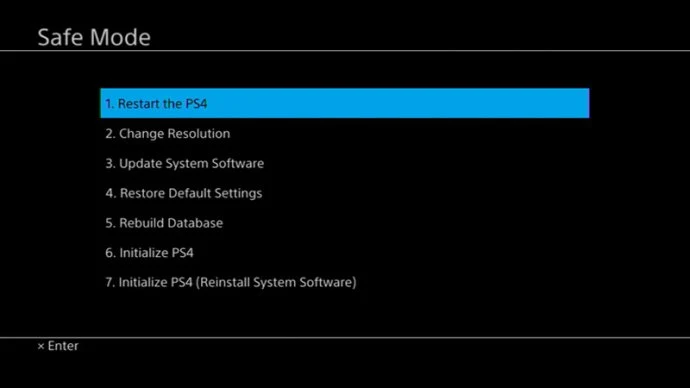
- Once in Safe Mode, choose option
6. Initialize PS4 - Press
OK,YES,NEXTorACCEPTto any additional options. - The PS4 will now clear the user data from the HDD and start fresh.
- REMOVE ANY ETHERNET CABLE AND/OR SKIP WI-FI SETUP. Keep everything offline during and after setting up your PS4 if you want to retain access to jailbreaks.
- After setup, navigate to Settings > System > Automatic Downloads. Uncheck
Featured Content,System Software Update Files,Allow RestartandApplication Update Files.
If you are on a jailbreakable firmware, you can go to the Getting Started page in order to determine the best jailbreak information for the current firmware it has.