 | If you want the ability to use homebrew, do not download firmware from the PlayStation website! Sony only hosts the latest unexploitable firmware version. Also, remove any discs from the console. |
In the event that you wish to update your firmware without connecting to PSN, or the console's operating system on the hard drive has become too corrupt, you can update via a USB storage device. Ensure that there is no disk inside the PS4 when attempting to update the firmware.
You cannot downgrade firmware by replacing the HDD or trying to install older firmware from a USB Drive. See FAQ for a more detailed explanation.
On the websites below, retail/official firmwares are update files that let you update from, for example, 8.50 to 9.00. Recovery firmwares are firmware reinstallation/recovery files that reinstall the hard drive operating system; this option is also used when replacing the HDD, and in either case you can stay on the same firmware the console is currently on or update to a higher firmware version.
- Download the desired retail/recovery firmware version file onto your PC by visiting one of the following sites. Do not get beta firmwares.
- DKS - PS4 Official Firmwares
- Recommended because of the faster download speeds.
- PS4 Firmwares - Darthsternie's Firmware Archive
- No account or CAPTCHA required; decent download speeds.
- Midnightchannel Archive
- No account or CAPTCHA required; slower download speeds.
- Retail Firmwares
- Recovery Firmwares
- PlayStation Support Page
- Only hosts the latest non-exploitable firmware version. Do not install this unless you are already aware that you will lose homebrew access, or if the console was already on the latest version anyway.
- If you want to update an existing console without removing any user data, you only need use a normal firmware update. They will be around 300 to 500 MB or more in size, depending on the version. Recovery updates can still be used, for this, but they aren't required.
- If you want to update an existing console, but want to also format it, you will need to download a recovery update instead. They will be around 800 MB to 1 GB or more in size, depending on the version.
- DKS - PS4 Official Firmwares
- Unpack your archive and or rename the .PUP file to PS4UPDATE.PUP (must be in all caps).
- Prepare a USB drive by formatting it to FAT32 or exFAT and creating a folder on the root of the drive named "PS4", and another folder inside "PS4" named "UPDATE". Copy PS4UPDATE.PUP into the "UPDATE" folder. The final structure should look like this:
PS4 > UPDATE > PS4UPDATE.PUP
- Plug the USB stick into an empty slot on your PS4.
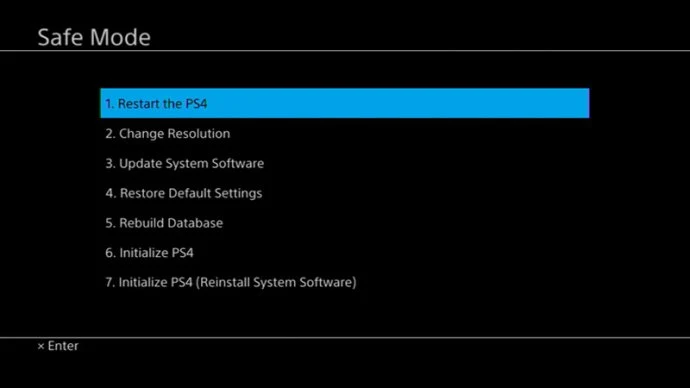
- Boot into PS4's Safe Mode menu by turning off the PS4 and holding the PS4 power button until it beeps 2 times. Safe Mode should look like this:
- Once in Safe Mode, choose option
3. Update System Software- If you want to format the PS4 while installing an update, choose
7. Initialize PS4 (Reinstall System Software)instead. This will require a recovery firmware file.
- If you want to format the PS4 while installing an update, choose
- In the following menu, choose option
1. Update from USB Storage Device - Press OK, YES, NEXT or ACCEPT to any additional options.
- The PS4 will now install the operating system on the HDD, while updating the firmware on the motherboard's flash chips.
- When the update has finished, your console will now be able to boot into the software version you updated to.
If you installed an old firmware version for homebrew access, REMOVE ANY ETHERNET CABLE AND/OR SKIP WI-FI SETUP. Keep everything offline during and after setting up your PS4.
- After setup, navigate to Settings > System > Automatic Downloads > Uncheck Featured Content, System Software Update Files, Allow Restart and Application Update Files.
- Continue the guide to use a jailbreak on your current firmware.